TL;DR: AI can automate parts of accounting, but that is not evidence that it can replace an accountable professional. Start with supervised routine work inside a bookkeeping practice: drafting transaction categories, flagging bank mismatches, catching duplicate payments, and pulling together routine reports. Keep ambiguous transactions, tax decisions, and client sign-off with a qualified person. Use AI for the routine drafts first, with a named reviewer checking each output.
A small practice owner asking this question is usually worried about one of two things: losing staff hours to a tool, or losing clients to a competitor who adopted one first. Those concerns deserve a task-by-task evaluation before you change staffing or promise clients a different service. AI is good at drafting and flagging inside a defined, repetitive task. It is not good at deciding what a transaction means for a specific client, and it still gets math wrong often enough that nobody should let it run unchecked.
Will AI Actually Replace Accountants and Bookkeepers?
Do not treat a task demonstration as proof that a whole professional role can be automated. Accounting Today's own rundown of what AI can and cannot do for the profession lands on a familiar split: it can process documents, spot patterns in large sets of transactions, and automate steps like invoice matching and expense categorization, but it still cannot automate an audit end to end, exercise professional skepticism, or make the ethical calls a practice is ultimately paid to make (Accounting Today).
A bookkeeping software vendor, Bank Reconciler, describes transaction coding, invoice matching, and anomaly detection as current uses. Its article also publishes accuracy and workload estimates. Those are vendor claims, not a benchmark for your practice, and we would not use them to forecast staffing or promise a client a result.
The useful distinction is between a routine entry with complete supporting records and a transaction whose meaning depends on an agreement or conversation. An owner's draw can resemble a vendor payment. A related party loan can resemble a refund. A one-time reimbursement can resemble revenue. Your test needs examples from both groups before you decide which suggestions deserve a quicker review.
Measure the review work as well as the drafting work. A tool that produces categories quickly but leaves staff investigating unsupported explanations may not save time. Keep a record of corrections, unresolved questions, and the supporting document for each decision. That gives you evidence about your own workflow instead of a percentage borrowed from a vendor's marketing page.
What Can AI Already Do Well Inside a Bookkeeping Workflow?
Four tasks are candidates for a supervised pilot, and none of them require you to hand over judgment calls.
Transaction categorization is the obvious starting point. A model can look at a vendor name, an amount, and the account history and propose a category with real speed, the way our own walkthrough on reviewing AI bank matches lays out step by step for owners checking suggestions before they get accepted.
Bank reconciliation flags come next. Instead of a person scrolling a statement line by line, the tool surfaces the unmatched deposit, the transfer that looks duplicated, or the charge that never showed up in the ledger, and hands a shorter list to a human for the actual decision.
Duplicate payment detection is a narrow, mechanical check that AI is well suited for: scanning invoice numbers and amounts across a vendor's history and surfacing the pair that looks like the same bill paid twice. A clerk still decides which one to void and documents why.
Routine report generation rounds it out. A first-pass profit and loss statement or cash flow summary, built from a ledger that is already reconciled, saves the drafting time without changing who approves the final number before it leaves the office.
What Still Needs a CPA's Judgment, Not a Model's Guess?
The tasks that stay with a person share a pattern: a wrong call is expensive, and the mistake does not announce itself the way a missing receipt does.
Ambiguous or related-party transactions top the list. A transfer between two accounts the owner controls, a loan to a family member's business, a reimbursement that might actually be compensation. None of those resolve from the transaction description alone. They need someone who knows the client's structure and can verify the answer to a follow-up question instead of relying on an assumption.
Tax positions are a flat no. A tool can summarize a rule or draft a plain-English explanation of a deduction, which is useful for client education, but it cannot take a position on a return and stand behind it if a taxing authority asks questions later. For the pilot, require a source document behind each suggested figure and compare totals with your accounting system. A fluent explanation does not establish that an amount, category, or rule is correct. Keep tax research separate from approval of an actual position.
Client context is the quieter risk. Accounting Today's own list of AI's weak spots calls out the same gap in different words: these systems struggle with the nuance and context that come from actually knowing a business, which matters more in accounting than in almost any other back-office function, because the same transaction can mean three different things depending on who the client is (Accounting Today).
Sign-off is the last one, and it is less a task than a rule. Something that touches a client's books, a filed return, or a number another business will rely on needs one named person who reviewed it and can explain why, every time, regardless of how finished the draft looks.
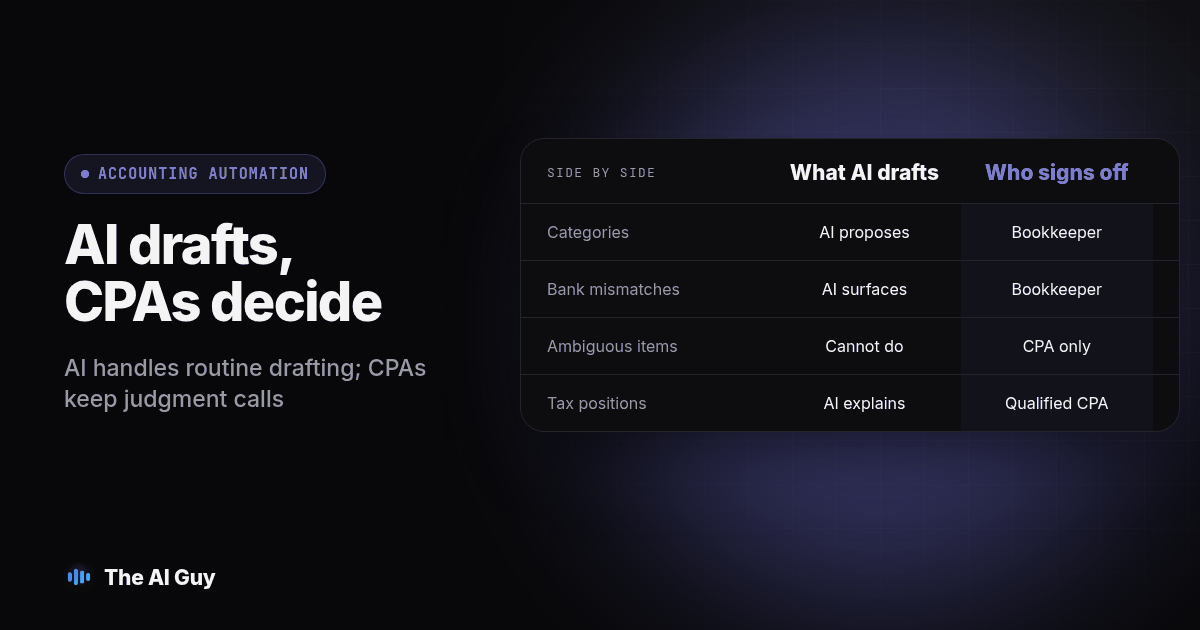
How Do AI Tasks Compare to What Still Needs a CPA?
Use this table as a starting division of labor for your own practice, not a universal rule. The column that matters is the one on the right: who signs off, and whether that person can actually explain the decision if a client or a regulator asks.
| Task | What AI handles today | Who still signs off |
|---|---|---|
| Routine transaction categorization | Drafts a category from vendor name, amount, and history | Bookkeeper reviews every suggestion during the pilot |
| Bank reconciliation flags | Surfaces unmatched deposits and likely duplicates | Bookkeeper confirms before marking the account reconciled |
| Duplicate payment detection | Scans invoice numbers and amounts for repeats | Staff decides which payment to void and documents why |
| Routine report drafts (P&L, cash flow) | Builds a first-pass report from a reconciled ledger | CPA reviews before anything leaves the office |
| Ambiguous or related-party transactions | Cannot reliably classify these on its own | CPA or senior bookkeeper who knows the client's structure |
| Tax positions | Can summarize a rule, cannot take a position | Qualified preparer reviews; applicable signing requirements still apply |
| Client-specific context (owner draws, intercompany loans) | May lack the agreement behind the number | The person who actually knows the client |
| Anything client-facing or filed | Draft only | Named reviewer, every time, no exceptions |
How Do You Test an AI Bookkeeping Tool Before You Trust It on a Live Client?
Treat this the same way we would recommend testing any AI tool before it touches real work: trust it only after you have checked it against something you already know cold.
- Pick one client whose books you already closed and reconciled by hand, and use an authorized, redacted copy of the bank feed and invoices from that month in a test workspace. Keep live posting disabled.
- Compare its category suggestions line by line against what you actually entered, and mark each one correct, wrong, or needs-context-it-could-not-have-had.
- Hand it a file with one deliberately ambiguous transaction, like an owner draw that reads like a vendor payment, and check whether it flags the uncertainty or guesses with confidence.
- Run its duplicate-payment flags against a vendor history where you already know there is exactly one real duplicate, and see if it finds that one without flagging clean pairs.
- Check its draft report's math against your own reconciled totals, line by line, the first several times, not just the final number.
- Record what the tool could access, what it flagged, and what a reviewer had to correct, in a simple log: task, input, expected result, actual result, correction, reviewer.
- Only after steps one through six come back clean should you move an authorized, low-risk task for one client into a limited pilot, with a named reviewer checking every output for the first month.
Skipping straight to step seven is how a drafting tool quietly starts making decisions nobody actually approved.
What Should a Small Practice Actually Adopt First?
Copy this into your own notes before you connect anything to a live client file.
- Start with one repetitive task, not your whole workflow: transaction categorization or bank reconciliation flags, not tax prep.
- Test it on one already-closed month you can check line by line, using the seven-step procedure above.
- Name one reviewer per task who signs off on the tool's output and can explain any correction they make.
- Keep ambiguous, related-party, and tax-position transactions out of the tool's queue entirely until a person has already sorted them.
- Write down, in one sentence, who at your practice is responsible if a client questions a number. That answer should never be "the AI."
- Revisit the pilot after thirty days using the same log you started it with, not your general impression of how it felt.
This is the same draft-then-confirm pattern that shows up anywhere a business lets AI touch something a client will see. Our sister site MetaTechAi walks through the identical tension for service businesses deciding whether AI should set the final price on a quote or only draft the number for a person to confirm. The answer there is the same shape as the answer here: AI drafts, a person with something to lose decides.
Is It Safe to Connect AI Tools to Bank Feeds and Client Financial Data?
Before connecting a tool, ask whether it needs access to a CRM or bank data at all, and it is a fair question before any tool talks to live files. Start with a copied, non-sensitive test file, the same way you would test any new piece of software before pointing it at a client's real ledger. Check what the tool actually stores once it has read a transaction, who else inside that vendor can see it, and whether you can revoke access cleanly if you stop using the tool. A correct-looking category suggestion does not prove safe data handling, and a written policy telling staff "do not upload client data" is not the same thing as an access control inside the tool itself.
How Does This Compare to the Rest of Our Small-Business AI Series?
We have walked through this same owner-level question for other service businesses before deciding it was time to answer it for accounting and bookkeeping specifically. The shape repeats: some tasks are ready for AI today, some need a license and a signature, and the dividing line is rarely where people assume. We laid out the same split for dentists deciding where to start with AI, for HVAC companies sorting dispatch and scheduling from diagnosis, and for insurance agents separating quote drafting from binding coverage. Accounting fits the same pattern, with its own specific list of tasks and its own specific list of things that stay with a licensed person.
What Are the FAQs About AI and Your Accounting Practice?
Will AI replace accountants and bookkeepers entirely?
Do not assume an AI tool can take over an entire accounting engagement. AI handles repetitive data work well, but professional judgment, tax positions, and client sign off still belong to a person who can be held accountable for them.
Is it safe to connect an AI tool to our bank feeds and client financial data?
Start with a copied, non sensitive test file before you connect anything live. Check what the tool actually stores, who else can see it, and whether you can revoke access, the same questions we would ask before connecting AI to any customer or financial record.
How long should we test an AI bookkeeping tool before trusting it on a real client?
Run it against one already closed month you already know cold before it ever touches an open file. Move forward only when its draft matches your own reconciled numbers, not simply because a trial period ended.
Does using AI for bookkeeping change what we tell clients about who reviewed their books?
Explain who reviewed and approved the numbers, and describe AI involvement accurately when relevant to the engagement. Only say a named person reviewed the work if that review actually happened. AI drafting a category or flagging a mismatch does not change who is responsible for the final answer.
What Should Your Practice Do This Week?
Pick one repetitive task, not your whole intake process, and run it through the seven-step test above against a client file you already know cold. If the draft holds up, name a reviewer and give it a thirty day pilot. If it does not, you have identified a problem before relying on the output in live work.
If you want a second opinion on where this fits for your specific practice, and which tasks on our table above you should leave alone for now, contact us and tell us what your team currently spends the most hours on. We will tell you plainly what is ready to hand off and what should stay exactly where it is.