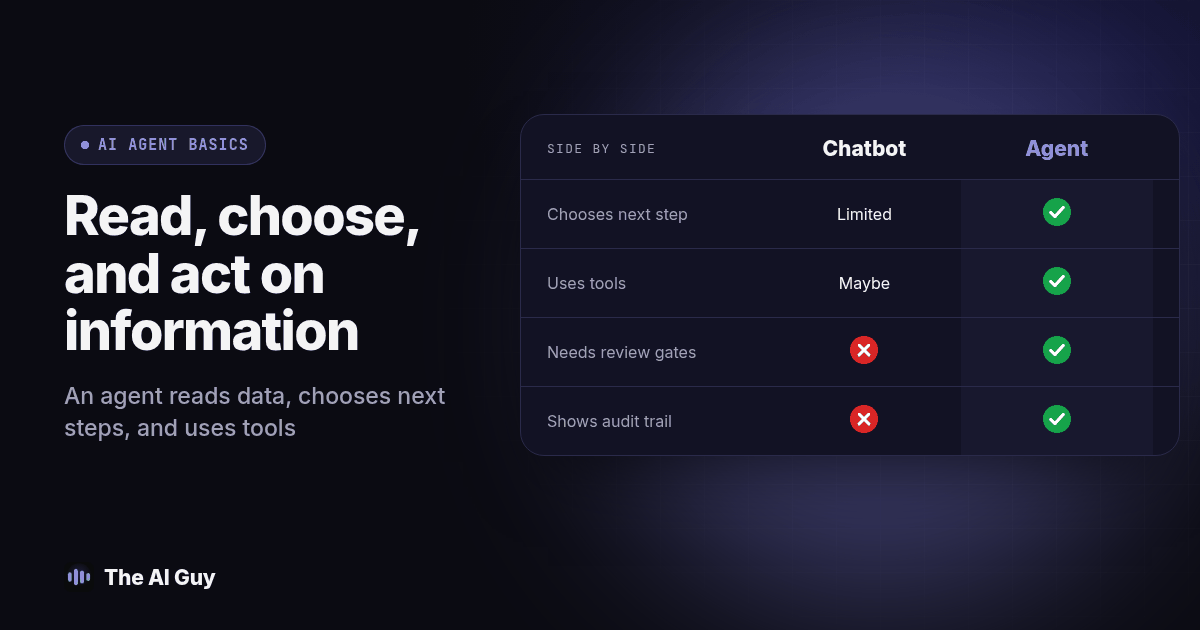
TL;DR: An AI agent is software that reads information, decides what to do next, and carries out that decision through tools and systems, adjusting its plan as it goes, instead of just answering a question and stopping. That makes it more useful than a scripted chatbot for a multi-step task, and more dangerous if you skip a review step, a data check, or a clear stop condition. The example below walks through a real follow-up task end to end, then the four places it tends to break.
Every vendor demo this quarter uses the word "agent," and almost none of them pause to define it before moving to pricing. That gap costs owners real money, because a tool that decides its own next step needs different guardrails than one that only replies to a message. Below is the plain-language version, one full example of an agent running an actual small business task, and the specific failure points we check before we ever recommend one to a client.
What Is an AI Agent, in Plain Terms?
An AI agent is a program built around a language model that can look at information, choose a next action from a set of tools, run that action, and check the result before deciding what to do after that. Google Cloud's explainer on what AI agents are describes this same loop: perceive the situation, decide, act, and learn from the outcome, repeated until the task is done or the agent hits a boundary it cannot cross. The important part for a buyer is not the word "learn." It is the loop itself, because a system that chooses its next step from what just happened behaves very differently from one that follows a fixed script.
Contrast that with a plain script. A script runs the same steps in the same order no matter what comes back from step one. An agent can look at the result of step one and pick a different step two. That single property, picking the next move instead of following a fixed path, is what separates "agent" from "automation" in practice, whatever the marketing page calls it.
None of that requires the system to be unsupervised. A well-built agent still works inside limits a person set: which systems it can read, which ones it can write to, and where it must stop and ask. The agent label describes how the software decides, not how much freedom you gave it. Those are two separate design choices, and a vendor who only talks about the first one has not told you anything about the second.
Many of those tool connections run through a shared standard called MCP, so an assistant can use a tool you already pay for instead of a custom bridge built just for that one pairing. Our explainer on MCP for a small business covers what that connection actually does and where it still falls short.
How Is an AI Agent Different From a Chatbot?
A chatbot is a conversational front end. Some chatbots follow a script; others generate replies with a model and can look fairly conversational while still only answering questions, never changing a record or taking an action on their own. An agent is defined by what happens behind that window: does it only describe what to do, or does it actually do it, check the result, and decide the next move from there?
That is why the two categories overlap instead of sitting apart. A chat window can sit on top of a fixed workflow, or it can sit on top of a true agent that plans several steps ahead. Watching the interface will not tell you which one you are buying. You have to watch it handle an unexpected answer, a missing record, or a request outside its scope, and see whether it stops, guesses, or correctly asks for help. Our full breakdown of AI agent versus chatbot walks through a six-step test you can run on any demo before you sign anything, including how to tell whether the tool is checking a real system or just generating a plausible-sounding reply.
What Does an AI Agent Look Like on a Real Follow-Up Task?
Picture a small HVAC company. A homeowner fills out a web form at 9:40 at night asking for a quote on a furnace tune-up, then goes to bed. Nobody on staff is awake to answer it, and by the time the office opens the next morning, three other companies have already texted that same homeowner.
Here is how an agent built for that one task actually runs it, step by step:
- It reads the form submission and pulls out the service type, the address, and the preferred contact method.
- It checks the address against the company's service area map before doing anything else, because a job outside the service zone needs a different response, not a booked slot.
- If the address is in range, it checks the scheduling calendar for open furnace-tune-up slots within two days, filtered to crews stocked for that job type.
- It drafts a text offering two specific times and sends it, using the phone number the homeowner typed into the form rather than a saved contact record that might not match.
- If the homeowner replies with a different day, it rechecks crew availability for that new day before confirming anything, rather than assuming the first slot is still open.
- Once a time is confirmed, it writes the appointment to the shared calendar and tags the CRM contact with the service requested, so the technician shows up prepared instead of guessing from a vague form entry.
- If the form includes words like "commercial," "no gas line," or anything the agent was not built to quote, it stops, flags the lead for a person, and sends the homeowner a short message that someone will call them, instead of guessing at a price.
That last step is the one most demos skip. A system that only knows how to do steps one through six, and does not know how to recognize step seven, will either make up an answer or silently drop the lead. Both are worse than a human noticing the form at 7 a.m.
Diagram: A simple left-to-right flowchart: "Form submitted" leads to a decision diamond "In service area?" with a "no" branch to "Flag for a person" and a "yes" branch into "Check calendar," then another decision diamond "Slot still open after reply?" with a "no" branch looping back to "Check calendar" and a "yes" branch to "Write to calendar + tag CRM," ending in a final decision diamond "Outside scope (commercial, special case)?" that routes either to "Confirm with homeowner" or back to "Flag for a person."
What Can Go Wrong When You Turn an AI Agent Loose on Real Work?
Three failure points show up over and over, and all three are design choices, not surprises the agent caused on its own.
Bad data going in. An agent that reads a CRM field mapped wrong, an old price sheet, or a duplicate contact record will act on that wrong information with total confidence. It has no instinct that something looks off, because nothing told it to check. Verify the data mapping before you allow the agent to act. Scope the data before you scope the task.
No review step. If nobody ever looks at what the agent actually did until a customer complains, you find out about a mistake weeks after it started. A chatbot that gives an unsupported answer can damage trust even if it cannot change a record. A review step does not have to mean reading every transcript. It can mean a daily report of what the agent booked, changed, or sent, reviewed by one person.
No stop condition. An agent needs a defined edge: a type of request it will not handle, a number of attempts after which it hands off instead of retrying, a word or phrase that tells it to stop and escalate. Anthropic's guide to building effective agents makes the same point from the builder's side: the agent should operate inside agreed limits and stop to check in when it is uncertain, rather than push forward on its own judgment past the point you trusted it with. Skip that boundary and the agent will keep acting past the point where a person would have stopped.
How Do You Set Up an AI Agent Without Getting Burned?
Use this as a working checklist before you give any agent real access to your business:
- Scope one task, not a department. Pick the single follow-up, scheduling, or data-entry task you want handled, and resist the urge to also hand it inbound calls, billing questions, and vendor emails on day one.
- Map data access by hand, in writing. List exactly which fields the agent can read and which ones it can write to. If you cannot name the fields, you are not ready to turn it on.
- Put an approval gate on the first batch of runs. Have a person confirm every action the agent takes for the first week, even if that feels slow, so you catch a bad pattern before it repeats fifty times.
- Write down the stop condition before launch. Decide, on paper, what kind of request gets flagged for a person instead of handled automatically, and test that exact case before go-live.
- Review a sample every week after launch. Ten minutes checking a handful of completed tasks against what actually happened in the destination system catches drift long before a customer does.
- Keep a record of every change you make to its instructions. If the agent starts behaving differently, you want to know whether that followed a prompt change, a new tool connection, or neither.
If the task also needs to reach people by phone, not just text or email, RizzDial's piece on giving your AI agent a phone covers what changes when the agent's next action is a live call instead of a message. And if you are still deciding whether to build this yourself or buy a packaged tool, our AI agent buying checklist covers the questions to ask a vendor before any money changes hands.
Should You Choose an AI Agent, Chatbot, or Plain Automation?
| Plain automation | Chatbot | AI agent | |
|---|---|---|---|
| How it decides | Fixed steps, same order every time | Replies to a message; may or may not act | Reads a result and picks its own next step |
| Tool and data access | Usually one connection, set at build time | Varies; often read-only | Can read and write across several systems in one task |
| Typical failure mode | Breaks loudly when an input doesn't match | Gives a wrong or unsupported answer | Confidently takes the wrong action unless it hits a boundary |
| Setup effort | Lower for a single, predictable trigger | Moderate; depends on scope | Higher; needs mapped access, a review step, and a stop condition |
| Right fit | A task that never changes shape | A known set of questions with a clear answer | A task where the next step depends on what the last step returned |
Plain automation still wins for anything that never changes shape, like sending the same reminder text three days before every appointment. A chatbot still wins for a known, bounded set of questions, like store hours or order status. Reach for an agent only when the task genuinely branches, the way the furnace-tune-up example above branches on service area, slot availability, and scope.
What FAQ Answers Do Business Owners Need About AI Agents?
Is it safe to give an AI agent access to my CRM or business data?
It depends on the permissions, task, and safeguards. Start with the smallest set of records and read actions needed for one task. Require a person to approve customer-facing messages and record changes during the pilot, and check the system's activity history after each run. Expand access only after the agent handles normal cases, missing data, duplicate records, and out-of-scope requests as expected. A connection standard or AI model does not by itself guarantee that a vendor has configured those controls.
What is the real difference between an AI agent and a chatbot?
A chatbot answers questions in a conversation. An AI agent reads information, decides what to do next, and carries out steps across a system, sometimes without a person typing anything. A chatbot can have an agent working behind it, and an agent can show up as a chat window, so the label on the product tells you less than watching it complete an actual task. We walk through a six-step test for exactly that in our agent versus chatbot guide.
What happens if the AI agent gets something wrong?
The impact depends on what it can change and whether it has a stop condition. A draft-only agent can produce a mistake for a person to catch. An agent with permission to message a customer or update a record can carry that mistake into a live workflow. Set an escalation rule for missing, conflicting, or out-of-scope information, then test that the agent pauses instead of guessing. Review its action log so you can identify and correct errors before expanding the pilot.
Do I need special software to run an AI agent, or can I build one with tools I already use?
Often you can connect an agent to tools you already pay for through a shared connection standard called MCP, without buying a separate platform for every tool. Whether that is enough depends on the task. Our explainer on MCP for a small business covers what that connection actually does, and our AI agent buying checklist covers what to check before you pay a vendor to build something custom.
Where Should You Start With an AI Agent?
Write down one task, the furnace-tune-up follow-up or your own version of it, before you take another vendor call. Name the system it needs to read, the system it needs to write to, and the one case where it should stop and hand off to you instead of guessing. That short exercise will tell you more about whether you need an agent, a chatbot, or plain automation than any sales pitch will.
If you want a second opinion on the task you wrote down, contact our team and walk us through it. We will tell you plainly whether an agent fits, or whether you are better off with something simpler.