TL;DR: A chatbot is a conversational interface; an AI agent can decide how to carry out a task, use tools, and adjust its next step from the results. The categories overlap, so a chatbot may have tool access or an agent behind it. Before buying, test what the system can complete, what decisions it makes, and where a person must approve its actions.
Ask a vendor whether their product is an agent or a chatbot, and the label alone will tell you little. The useful test is whether the tool can complete your specific task with the right information and permissions. This guide gives you the plain-language distinction, a short test for any demo, and a checklist to use before you sign anything.
What Actually Makes Something an AI Agent Instead of a Chatbot?
A chatbot communicates through text or voice. Some follow a script, while others generate replies with a language model. Modern chatbots can retain conversation context and connect to business systems, so answering questions and taking actions are not mutually exclusive categories. IBM's explanation of chatbots describes both scripted and AI versions, including bots that retrieve records or complete transactions.
An agent describes how work is controlled, rather than how the conversation looks. In Anthropic's guide to building effective agents, a fixed workflow follows predefined paths, while an agent lets the model choose its process and tools as it works. For purchasing purposes, look for a system that checks the result of a step and decides what to do next within agreed limits.
That distinction matters when you review a demo. A chat window can sit in front of a fixed booking workflow or a more flexible agent. Neither the window nor the ability to save an appointment proves which design is underneath. Ask the implementer to show which decisions are predetermined and which the model makes from the information it receives.
Consider a hypothetical appointment request. A fixed workflow might always check one calendar and offer available times. An agent might select an appropriate calendar after clarifying the service, then change its approach if no suitable time is available. Both can be useful. Your buying decision depends on whether that flexibility is necessary and whether the extra decisions can be tested and supervised.
Why Does a Vendor Keep Calling Their Chatbot an "Agent"?
Vendors use the word in different ways. Sometimes a team means a conversation with tool access; sometimes it means a system that chooses its own sequence of actions. You do not need to settle the terminology debate to buy sensibly. Ask for a description of the behavior you are paying for, written in terms of your actual workflow.
A single order lookup is useful, but it does not prove the system can resolve an incomplete order, choose another source, or recover after a failed request. Equally, a system that follows a fixed path may be exactly what you need. We would ask what happens after the first lookup fails and compare that behavior with the agreed scope.
ServiceNow's AI agents versus chatbots explainer contrasts predictable scripted conversations with more adaptive agent behavior. Treat that as a comparison with traditional bots, not proof that every chatbot lacks context or integrations. If the vendor cannot explain the decisions in your calendar, CRM, or ticketing queue, the category name does not resolve the purchase.
What Happens When the Tool Does Not Know the Answer?
This is a useful acceptance test for either design. A scripted chatbot may return a fallback when it cannot match a request. A system using a language model may generate an unsupported answer unless its knowledge boundaries and escalation behavior have been designed and tested. Do not confuse fluent wording with evidence that it knows your policy.
In an October 7 client call, an online education membership reported turning off its AI chatbot after it gave wrong answers to expert questions. That is a reported client experience, not a controlled comparison between architectures. It does not tell us which model or configuration caused the failure. It does give us a concrete question to put in the buying checklist: when a request needs subject-matter expertise, who receives it instead of the software guessing?
An agent does not automatically solve this. A poorly built agent can take a wrong first action just as confidently as a chatbot gives a wrong answer, and because an agent can act in another system, a wrong action can be more expensive to undo than a wrong sentence. The review point should change between the two: a conversation-only tool can give a bad answer, while any system with action permissions can also make a change a person has to notice and reverse. Ask any vendor exactly what happens at the edge of its scope, and ask for a live example instead of a slide.
AI Agent vs Chatbot: Which One Actually Does What for Your Business?
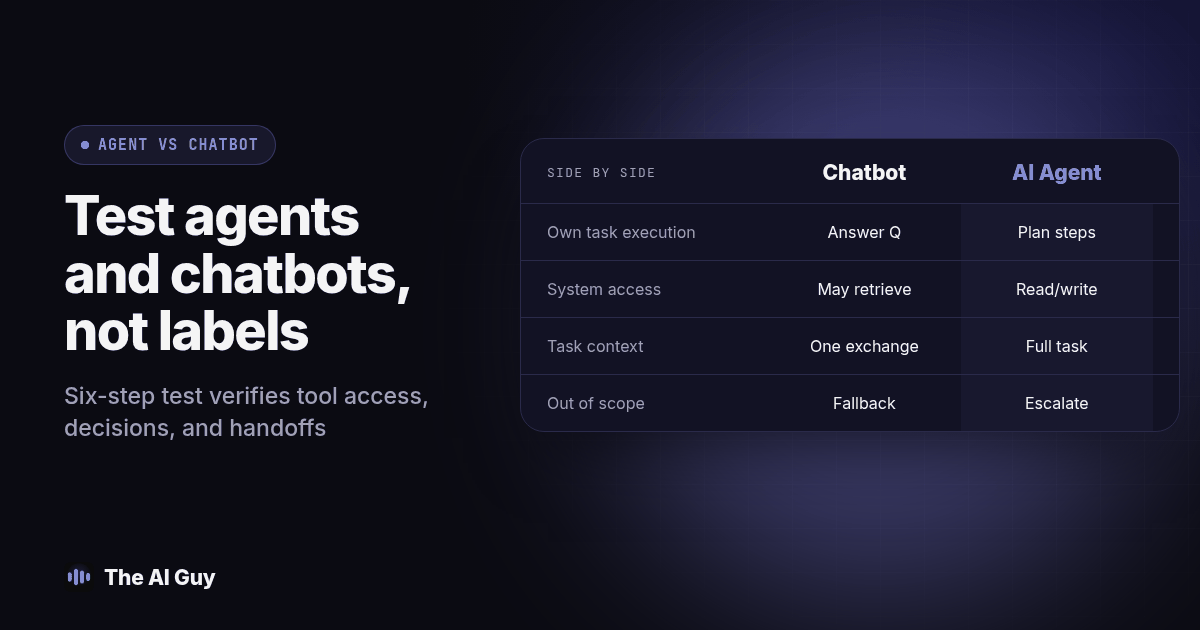
Use this table as a starting filter for any tool pitched to you under either label. It describes what to check in a demo, not a fixed rule that never has exceptions, since a chatbot with one tool call and an agent with a narrow scope can sit close to the middle.
| Question to ask | Chatbot | AI Agent |
|---|---|---|
| What can it do on its own? | Answer a question or guide a conversation, one exchange at a time | Plan a sequence of steps and decide which tools to use along the way |
| Does it take action in another system? | May retrieve information or perform configured actions | May use read or write tools within its allowed scope |
| Does it remember context across a whole task? | Can retain conversation context; wider state depends on implementation | Should track where it is in a multi-step task and what happened earlier in it |
| What happens on an unscoped question? | Needs a defined fallback, or it may guess | Needs the same defined fallback; acting on a wrong guess costs more to undo |
| Typical setup effort | Often lower, especially for a narrow, scripted use case | Usually higher: more tool connections and more testing before launch |
| Right fit | A well-defined set of questions with a known answer list | A task where the next step depends on what the last step returned |
How Do You Test Any Tool Pitched to You as an "AI Agent"?
Run this original six-step acceptance procedure before you sign a contract. Use a vendor test environment and fictional records, with outbound contact disabled. These are proposed tests, not claimed customer results. Record the expected outcome before the vendor runs each case.
- Write down one real, multi-step task from your own business, something like "when a lead replies to our follow-up text, check if they already have an appointment, and if not, offer the next three open slots." A single question like "what are your hours" will not expose anything, because a chatbot can answer that just as well.
- Ask the vendor to run that exact task live, not a prepared demo of a different task. Watch for whether the tool actually checks a real system (a calendar, a CRM) or just generates a plausible-sounding reply without looking anything up.
- Introduce one wrinkle partway through, such as telling it the first offered appointment time does not work, and watch what it does next. Either design should retain the relevant context if that is part of its scope. Check whether it changes the plan appropriately and avoids offering the rejected slot again.
- Ask what happens when the task hits something outside its scope, like a request the tool was never built to handle. Require a live example of the escalation, not a description of one. Check who receives the unresolved request and whether the handoff includes enough context to help the customer.
- Ask exactly which systems the tool can read from and which ones it can write to, and get the list in writing. Read-only research can still be agentic when the system chooses and revises its steps. If your task requires a booking or update, verify the saved result in the destination system; a message saying "done" is not proof.
- Price the task, not the seat. Ask what it costs to complete the specific multi-step task you tested, including implementation, usage, maintenance, and staff review. Billing is not evidence of architecture. Agree what counts as a completed task and how failed attempts appear in the usage record.
Use this copy-and-paste request to make the next demonstration concrete:
Please demonstrate [task] using [fictional record] in a test account. The expected result is [observable outcome]. Show the information read, the decision made, and any record changed. Then repeat with a missing record, an unavailable appointment, and a request outside scope. Identify the approval point, the person receiving an escalation, and how we can stop or reverse an unintended action. Please separate capabilities available today from work you would need to build.
Keep a small acceptance worksheet with columns for input, expected result, actual result, evidence, reviewer, and unresolved issue. Save the destination record identifier beside the conversation so you can check whether they agree. Mark a case incomplete if the system claims success without a corresponding result. A polished transcript should not erase a failed action from your review.
Keep your notes from this session. If the vendor changes the underlying model or adds a new tool connection later, rerun the same test before you trust the new version with the same task.
Which One Should You Actually Buy First?
Start with a chatbot, or a chatbot with one well-scoped tool call, when your task is a known, bounded set of questions with a clear right answer: hours, pricing tiers, order status, appointment confirmation. Our guide on choosing which business tasks to automate with AI first walks through how to pick that first task so you are not guessing.
Move toward an agent only when the task genuinely needs more than one step and the next step depends on information the tool has to go get. Our comparison of AI agents versus automation tools for a small business covers the related question of when a fixed workflow is enough and when you actually need something that decides its own next step, and our virtual assistant versus AI agent guide covers the question of whether that multi-step task needs a person's judgment instead of either kind of software. If what you actually want is someone to scope, build, and maintain either option for you, our explainer on what an AI automation agency does describes what that work looks like end to end.
Either way, the label on the pricing page should never be the deciding factor. A well-built chatbot that is honest about its limits will serve you better than a poorly built agent that takes wrong actions confidently. Test the behavior, not the brochure.
What FAQs Do Small Business Owners Ask About Agents and Chatbots?
Is an AI agent just a chatbot with a new name?
Not necessarily. A chatbot describes a conversational interface, while an agent describes a system that can choose steps and tools toward a goal. One product can be both. Ask the vendor to demonstrate which decisions the system makes, what it checks after each action, and when it stops for a person. A new label alone does not establish a new capability.
What happens when the tool does not know the answer?
Neither label guarantees a safe fallback. A scripted tool may stop at an unmatched request; a model-driven tool may produce an unsupported answer. The membership client described above reported disabling its chatbot after incorrect expert answers. A properly built agent, or a chatbot with the right guardrails, should recognize the edge of its knowledge and hand the question to a person instead of guessing.
Does an AI agent cost more than a chatbot?
Neither label tells you the price. A simple scripted chatbot can be cheap because it only has a fixed set of responses to maintain, while an agent that calls multiple tools and holds state across a task usually costs more to build and run because there is more to test and more that can go wrong. Ask for the price per completed task or per resolved case, not a flat software fee, so you can compare the real cost of getting the outcome you actually want.
Will an AI agent connect to the tools I already use, like my calendar or CRM?
Only if someone built that connection, either the vendor through a published integration or a developer through custom code; the word agent does not guarantee any tool access by itself. Our explainer on MCP for a small business explains one approach to connecting assistants and business tools, and the vendor should be able to name the exact systems their tool can read from and write to before you buy.
If I start with a chatbot, how hard is it to move to an agent later?
It depends on how much of the original work is reusable, not just on swapping labels. The scripted answers and FAQ content from a chatbot can usually carry over as reference material, but the planning, tool connections, and action steps an agent needs are a separate build, closer to a new project than an upgrade. Keep a record of exactly which questions and tasks the chatbot handled well so a developer building the agent version is not starting from nothing.
Where Should You Go From Here?
Pull up the tool a vendor is pitching you as an "AI agent" and run the six-step test before your next call. For a related calling use case, RizzDial offers AI voice agents and direct GoHighLevel integration. Its guide to dialing for GoHighLevel teams provides context for evaluating a calling workflow. Ask for a demonstration of your required actions rather than assuming the product category guarantees them.
If you are not sure whether the task on your desk needs a chatbot, an agent, or a person, contact us and describe the task in plain terms. We will tell you which one actually fits before you pay for the wrong label.