TL;DR: Your small business needs a chatbot only if repeated customer questions have documented answers and someone can maintain them. Start by deciding which questions a bot could handle safely today. Count how many repeat questions you already answer by phone, text, or email, write down which ones have one documented answer, and only build the bot around that narrow list. Test it against real questions and a set of trap questions before you ever put it on your website.
A small business owner does not usually ask "should I get a chatbot" out of curiosity. They ask it after watching a competitor's site pop up a chat window, or after a slow week of answering the same five questions by phone. The honest answer is: maybe, but not yet, and not for everything. Decide what the bot would actually be allowed to answer before you pick a platform, because the platform choice is the easy part and the scope decision is the one that determines whether launch day goes well.
Does Your Small Business Actually Need a Chatbot Right Now?
Start by counting, not guessing. Pull your last month of customer emails, texts, and voicemails and tag every message that is a question rather than a transaction. If the same five or six questions keep showing up, hours, location, what you charge for a specific service, how to book, whether you take a certain insurance or payment method, you have a real candidate for automation. If the questions are all over the map, mostly specific to one customer's situation, a chatbot will struggle no matter how well you build it, because there is no narrow, repeatable set of answers for it to learn.
A chatbot earns its place by removing repetitive work from a person, not by looking modern on your homepage. If nobody on your team is currently buried answering the same question over and over, a chatbot is solving a problem you do not have yet. Small business adoption of generative AI chatbots has grown quickly, climbing to the second most used technology tool among small businesses that use any tech at all, trailing only search engines, according to the U.S. Chamber of Commerce's 2025 small business technology survey. That survey measures businesses using chatbot tools, not how many installed customer-facing website bots. Growth like that is a reason to look seriously at the option, not a reason to skip the counting step above and assume your business needs one because everyone else seems to have one.
What Should a Small Business Chatbot Be Allowed to Answer, and What Should It Never Touch?
Write two lists before you write a single prompt: what the bot is approved to answer, and what it must always decline. The approved list should only contain questions with one correct, documented answer that does not change based on a customer's specific situation: your hours, your service area, your stated refund window, your general booking steps, your published FAQ. Anything that depends on judgment, a regulation, or one customer's particular circumstances belongs on the decline list, no matter how simple the question sounds on the surface.
This is also where the difference between a chatbot and something closer to an AI agent starts to matter. If what you actually need is a tool that takes an action on a customer's behalf, booking an appointment, pulling an order status, not just answering a question, read our breakdown of the real difference between an AI agent and a chatbot before you shop for either one, since vendors use both words loosely.
The FTC has already put businesses on notice about how far a chatbot can go before it crosses into deceptive or harmful territory. Fenwick's summary of the FTC's guidance lists five practices to avoid: misrepresenting what the bot actually is or can do, shipping it without checking for harmful or false output first, inserting undisclosed sponsored content into its answers, using the trust a customer builds with a bot to push sales or collect data they did not agree to, and quietly changing how customer data gets used. None of that is exotic for a typical small business, but it does mean your decline list should include anything that could read as medical, legal, or financial advice, and anything that touches a customer's personal data beyond what they volunteered to ask about.
Which Signs Mean You Should Wait Before You Build One?
Not every business is ready, and waiting is a legitimate decision, not a failure to keep up. Use this table to check your own situation against common launch-readiness signals before you commit budget or staff time to the project.
| Signal | Build a scoped chatbot now | Wait, or start smaller |
|---|---|---|
| Same handful of questions repeat daily across calls, texts, and email | Yes, a narrow approved list already exists in your inbox | |
| Your policies (refunds, hours, service area) are written down somewhere official | Yes, you have source documents to ground answers in | |
| Most customer questions depend on their specific account, order, or situation | Yes, a document library cannot answer those safely | |
| Nobody owns reviewing wrong answers or updating the approved documents | Yes, assign an owner first, then build | |
| You cannot name, in writing, what the bot should never answer | Yes, finish that list before you touch a platform | |
| Customers mostly reach you by text or phone already, not your website | Start with a simpler text-based channel instead |
If most of your checks land in the right column, that is useful information, not a dead end. A narrower project, or a different channel entirely, beats a chatbot that answers confidently outside its depth on day one.
How Do You Scope a Chatbot Before You Write a Single Prompt?
Treat scoping as its own project with a clear start and finish, separate from picking a vendor. Work through these steps in order.
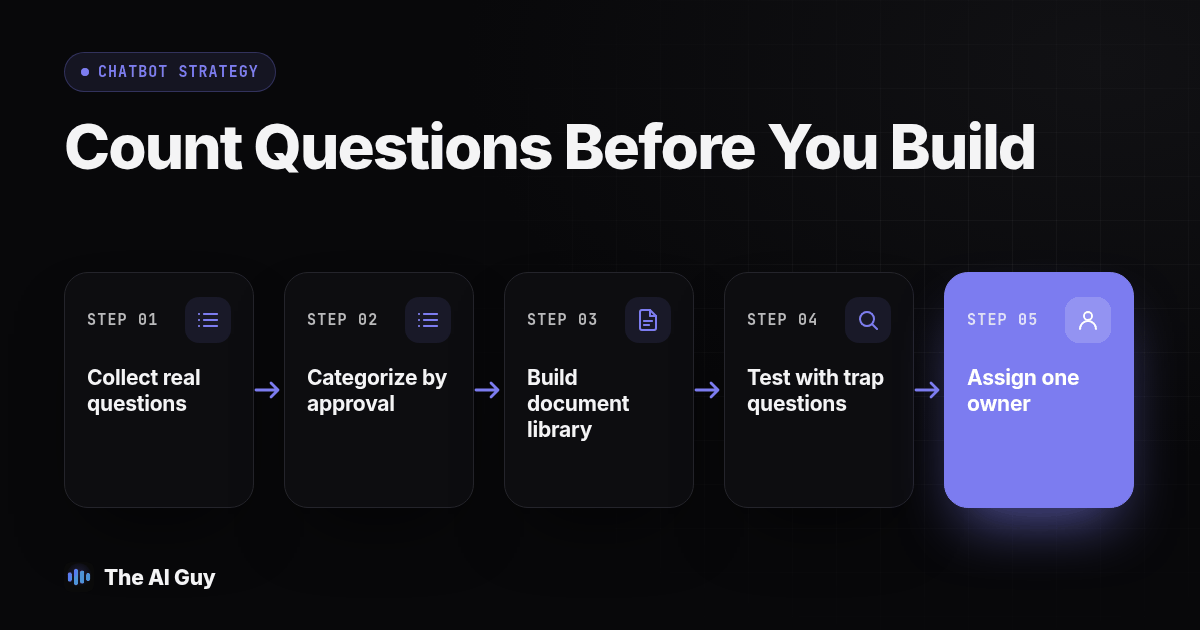
- Collect real questions, not assumptions. Pull at least 30 days of actual customer emails, texts, voicemails, and front desk notes. Write down the questions verbatim, in the customer's own wording.
- Sort every question into two piles. One pile has a single documented answer that holds for every customer. The other depends on judgment, a regulation, or one customer's specific situation. Only the first pile is a chatbot candidate.
- Write the approved-topics list and the decline list as separate documents. Keep both short enough that one person can read and audit them in a sitting; a list nobody can finish reading will not get maintained.
- Build the source library the bot will cite from. Our guide on how to train an AI assistant on your business information walks through assigning an owner and a review date to every document, which is the same groundwork a chatbot needs before it answers a single customer.
- Write the exact decline-and-handoff behavior. Decide what the bot says when a question falls outside the approved list, and who or what it hands the customer to: a named contact, a phone number, a ticket queue. "I don't know" with a real next step is a correct answer worth testing for.
- Pick the channel based on where your customers already are, not on what looks newest. A website widget only helps if people are already on your website asking these questions; many small businesses get more repeat questions by text or phone than through the site.
- Name one owner for the whole project before launch. Someone has to be responsible for reviewing wrong answers and updating the document library after launch, and that cannot be a shared responsibility nobody actually holds.
How Do You Test the Boundary Before Launch?
Testing before launch is what separates a scoped chatbot from a chatbot that merely has a scope document nobody checked. Run this procedure against a staging version of the bot before it ever reaches a real customer.
- Pull 20 real questions from the list you gathered in step one above, split roughly evenly between your approved topics and your decline list.
- Run every question through the bot and log three things: the answer given, whether it cited a specific approved document, and whether the answer matches what your own staff would say.
- Flag anything that reads as a promise, a medical, legal, or financial judgment call, or a specific account detail. Those answers fail the test regardless of how confident or polished they sound.
- Confirm every decline-list question actually gets declined, with the named handoff, not a vague apology that leaves the customer stuck.
- Write five to ten "trap questions" that sound like your approved topics but actually require judgment or depend on a specific customer's case. A bot that is truly scoped should decline every one of them.
- Have a second person who did not build the bot run their own five questions blind, without seeing your test list first. Builders unconsciously test around the gaps they already know about.
- Set the launch bar in writing before you run the test, not after you see the results. For this pilot, use this bar: every decline-list and trap question must be declined, and every approved-topic answer must cite the correct document.
Copy this short scope charter and fill it in before you launch anything:
CHATBOT SCOPE CHARTER
Business:
Launch date:
Owner (reviews wrong answers, updates documents):
APPROVED TOPICS (one documented answer each):
1.
2.
3.
ALWAYS DECLINE AND HAND OFF:
1.
2.
3.
DECLINE MESSAGE + HANDOFF CONTACT:
TEST LOG LOCATION:
LAST REVIEW DATE:
Keep that file somewhere your team can actually find it later, and rerun the test list every time you add a document or change an instruction, not only before the first launch.
What Should You Do Instead, If You're Not Ready for a Full Chatbot?
If your table above pointed toward "wait," you still have options besides doing nothing. Many small businesses get more repeat questions through text than through a website contact form, simply because customers already have their phone in hand. Starting with a text-based channel, where a real person or a narrowly scoped assistant answers through the same iMessage thread a customer already uses, lets you test which questions actually repeat before you build a wider chatbot around guesses. Beam's guide on using iMessage for business conversations covers how that channel works if texting, rather than a website widget, is actually where your customers are asking.
Either way, the counting and scoping work above is not wasted if you start smaller. The approved-topics list, the decline list, and the test questions carry over directly whether you launch a text channel first or go straight to a website chatbot later.
What FAQs Do Small Business Owners Ask Before Building a Chatbot?
How much should a small business expect to spend on an AI chatbot?
Cost depends on how much of the work you do yourself versus pay someone else to do: writing the approved-document library, deciding what the bot can and cannot answer, and testing it before launch all take real hours whether you build it with a low-cost platform or hire help. Price the platform separately from the setup labor, and treat a cheap monthly plan with no scoping work behind it as the more expensive mistake, since a wrong answer costs you a customer's trust.
How long does it actually take to scope and launch a chatbot?
Plan on gathering real customer questions for a week or two before you write a single prompt, then budget separate time to build the approved-document library, write the decline-and-handoff rule, and run the test procedure above with a second reviewer. A narrow, well-documented business can move faster than one with scattered policies nobody has written down yet, since writing those down is most of the actual work.
Will a scoped chatbot still connect to our booking system, CRM, or calendar?
It can, if the platform supports those integrations and the right access controls. Decide separately what the bot may say and which connected actions it may perform. Require identity checks before showing account details, and limit knowledge answers to documents you approved. Test the connection and the knowledge boundary separately, because a bot that reads your calendar correctly can still guess at a policy question if you never scoped that part.
Is a scoped chatbot automatically compliant, or do we still need to review anything?
Scoping reduces risk, it does not create compliance by itself. The FTC has warned businesses against letting a chatbot misrepresent what it actually is or can do, against shipping one without checking for harmful or false output first, and against quietly using chatbot conversations to collect data without telling people, according to the FTC's guidance covered in Fenwick's summary of five chatbot practices to avoid (fenwick.com). Read your own privacy policy against what the bot actually collects before launch, not after.
If we launch a basic chatbot now, is it expensive to switch tools or add more scope later?
The real switching cost is your approved-document library and test question list, not the chat widget itself. Keep both of those as your own files, not locked inside one vendor's dashboard, and you can evaluate a replacement against the same source material and rerun the same tests later. Check its import formats and integration requirements first. Starting narrow and expanding the document set over time can reduce rework compared with guessing at full scope on day one and relaunching after a bad answer.
Where Should You Start Tomorrow Morning?
Pull last month's customer questions before you look at a single chatbot platform. That one habit, counting what people actually ask instead of guessing, decides almost everything else in this article: whether you need a bot at all, what it should be allowed to answer, and how long the scoping work will take. If your chatbot already gave a wrong answer and you are deciding whether to fix it or shut it off, our separate guide on what to do when a chatbot gives wrong answers covers that recovery step by step; this one is for before you launch, not after.
If you want a second set of eyes on your approved list, your decline list, or the questions your business gets asked every week, talk to us and bring the real list. We will tell you plainly whether a chatbot fits your business yet, or whether a narrower channel will serve your customers better for now.