TL;DR: Pause customer-facing answers if you cannot identify which ones are reliable. Wrong answers can come from missing sources, outdated documents, retrieval failures, or unsupported model guesses. Scope the bot to your own approved documents, make it cite what it used, send anything outside that scope to a person, and test it with real questions before you trust it again.
A business owner raised this problem on a call: "Our AI chatbot gave wrong answers to expert questions, so we turned it off." That is a concrete reason to review a live deployment, not just a theoretical concern about AI. Pausing can be the right emergency reaction. Next, inspect the actual questions and source documents before deciding whether to scope the tool, replace it, or retire it. The public MyCity case below shows why confident answers deserve that scrutiny.
Why Did Our Chatbot Give Wrong Answers to Expert Questions?
Most business chatbots run on a general-purpose language model, and a general-purpose model does not know your refund policy, your service area, or the specific rule your industry regulator enforces this year. When a member or customer asks something the model was never given a source for, it may not stop and say "I don't know." It can produce the most plausible-sounding answer it can construct, confidently, in your brand voice, with no flag attached.
The National Institute of Standards and Technology calls this failure mode "confabulation" in its generative AI risk profile: the confident presentation of erroneous or false content that a user has no obvious way to catch, per NIST AI 600-1. That framing matters for a small business owner because it reframes the question. A chatbot giving wrong answers does not identify the root cause by itself. Inspect the sources, retrieval results, instructions, and final response separately. Expert questions, the kind your member asked, are exactly where that edge shows up first, because a generic answer sounds just as fluent as a correct one.
What Did New York City's MyCity Chatbot Get Wrong, and What Does It Still Teach Us?
In March 2024, The Markup tested New York City's MyCity chatbot, launched the previous October to help business owners. It reported incorrect answers about taking workers' tips, accepting housing vouchers, and operating without cash payments. These are historical examples from that investigation, not a statement of current legal requirements.
The reporting also described city-source information and warnings on the chatbot page. A city spokesperson defended the pilot while acknowledging the need to improve it. The case therefore does not prove that nobody supplied documents or boundaries. It shows why supplied sources and disclaimers do not, on their own, establish that the answers are reliable.
That disclaimer is the real lesson. A warning label does not stop a business owner from acting on a confident, specific-sounding answer about a legal obligation. If your chatbot can get asked a regulatory question, a pricing exception, or anything your industry's expert would answer differently depending on specific facts, a disclaimer buried in a footer will not save the person who trusted the answer. The fix has to happen before the bot answers, not after.
Should You Turn the Chatbot Off Completely?
Sometimes, yes, at least temporarily. If the chatbot is customer-facing and you cannot say with confidence which questions it is safe to answer right now, taking it down while you rebuild its boundary is the responsible move. The owner who raised this question did exactly that. Do not keep a tool running solely because its chat window looks polished.
But permanent removal trades one problem for another. Every question the chatbot answered correctly, the hours lookup, the "where do I find my login," the basic policy question, now goes back to a person, at the exact moment you decided AI support was not reliable enough to leave running. Before you decide the whole category is a bad fit, separate the actual failure (wrong answers to expert questions) from the tool itself (which may still have handled routine questions correctly). The honest test is whether you can name, in writing, the specific question categories the bot keeps getting wrong, and whether those categories are a small, fenceable slice of what it handles or nearly everything.
What Can a Scoped Chatbot Actually Answer Safely?
A scoped chatbot is configured to answer from approved sources and decline questions outside them. Those are required behaviors to test, not guarantees created by an instruction. That is a meaningfully different product than a general chatbot wearing your logo, even if the chat window looks identical. Our guide on the real difference between an AI agent and a chatbot covers how to test what any vendor's tool actually does before you trust the label on the pricing page, which matters here too: "chatbot" and "scoped chatbot" are not the same purchase.
In practice, a well-scoped chatbot handles things with one clear, documented answer: your hours, your service list, your stated refund window, your general enrollment steps, your published FAQ. It should decline, by design, anything that depends on specifics the documents do not cover, like a member's individual account history, a judgment call your compliance team would want to review, or a question your own staff would say "it depends" to before answering.
How Do You Ground Chatbot Answers in Your Own Documents With Citations?
Grounding means the chatbot answers from a defined library of documents you approved, and names which document it used. We wrote a full walkthrough of this setup in how to train an AI assistant on your business information, covering how to build the approved library, assign an owner and a date to every document, and write the instruction that tells the bot what to do when the answer is not in there.
The short version for a membership or expert-question setting: put your actual course material, your published policies, and your written FAQ into the library, keep the library small enough that one person can audit it, and require every answer to name its source document. If the chatbot cannot point to a specific document, it should say it does not know rather than filling the gap with something that merely sounds plausible. Check that each citation actually supports the answer. A document name alone does not prove the model used the right passage or interpreted it correctly.
When Should a Question Go to a Person Instead of the Bot?
Route a question to a person whenever the correct answer depends on judgment, current regulation, or an individual's specific situation rather than a fact sitting in a document. The reported expert questions illustrate the distinction: a member asking something that required actual subject-matter judgment, not a lookup, is precisely the case a document library cannot answer safely no matter how well you ground it.
Build that handoff into the bot's instructions directly, not as an afterthought. When a question falls outside the approved library, or touches a legal, medical, financial, or safety topic your business is not licensed to advise on, the bot should say so plainly and hand the person a named contact or a ticket, instead of guessing in a reassuring tone. Treat "I don't know, here's who can help" as a correct answer, worth testing for, not a failure state.
What Should Change When You Scope the Chatbot Instead of Killing It?
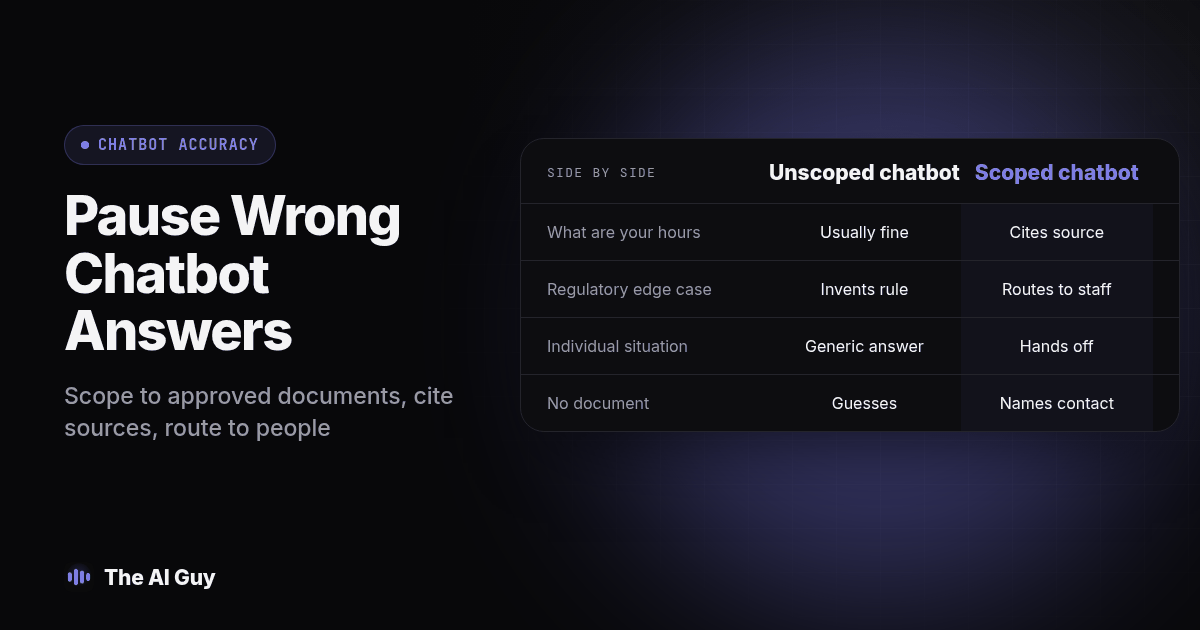
The scoped column describes acceptance criteria to verify, not automatic platform guarantees.
| Question type | Open, unscoped chatbot | Scoped and grounded chatbot |
|---|---|---|
| "What are your hours?" | Usually fine either way | Answers from the published hours document, cites it |
| A regulation or policy edge case | May invent a plausible-sounding rule | Declines and names a document, or routes to a person |
| An individual member's specific situation | May answer generically as if it applies to everyone | Refuses and hands off, since no document covers one person's case |
| A question with no document behind it | Guesses in a confident tone | States it does not know and names a contact |
| Staff effort to maintain | Low day to day, high when something goes wrong | Ongoing: document owners, dates, and periodic retesting |
Create a test log spreadsheet with columns for the question, cited document and passage, answer given, expected behavior, reviewer, and pass or fail. Mark any expert question without an approved answer as a required handoff. Keep the original failed response so reviewers can compare the repair against what actually happened.
How Do You Test and Relaunch a Chatbot Before Trusting It Again?
Run this before you turn the bot back on for members or customers. It is the same discipline RizzDial recommends for retesting a voice agent after a prompt change: a tool that changed its instructions needs to earn trust again with real test cases, not an assumption that the fix worked.
- Write down the exact questions that caused the original failure. Use the real wording your member or customer used, not a cleaned-up paraphrase.
- Pull the document that should have answered each one correctly, or confirm no document exists yet. If no document covers it, that question belongs in the "route to a person" category, not the knowledge library.
- Write the fallback instruction and the document library, following the approved-library setup above.
- Run the original failing questions back through the bot and check two things: did it answer correctly, and did it cite the right document. Reject unsupported answers even when they sound correct, and open each cited passage to check its support.
- Add ten to fifteen new test questions your team expects members to ask, mixing easy lookups with edge cases you know the library does not cover.
- Confirm the bot declines the uncovered questions and names a real contact, instead of attempting an answer.
- Keep this test list as a permanent file, and rerun all of it, not just the new questions, every time you add a document or change the instructions.
Keep a reviewer's name on every test run. If the same person who wrote the instructions is the only one checking the results, gaps that are obvious to a fresh set of eyes tend to survive the review.
What Should You Do Today If Your Chatbot Already Gave a Wrong Answer?
Use this as a same-day checklist, before you decide to relaunch or retire anything.
- Confirm which specific questions produced wrong answers, in the member's or customer's own words.
- Check whether any wrong answer has already been acted on by someone, and if so, follow up with that person directly.
- Pull the chatbot's conversation logs for the past month and scan for other instances of the same wrong answer, not just the one that got reported.
- Decide, in writing, which question categories are staying off limits to the bot entirely, regardless of how the scoping project goes.
- Set a date to relaunch only after the seven-step test above passes with a named reviewer.
Keep that list somewhere your team can see it, with an owner and a review date. Record the failure and the repair together so a later document update does not quietly reintroduce the same problem.
What FAQs Do Business Owners Ask About Chatbots Giving Wrong Answers?
Does scoping a chatbot down cost more than just leaving it off?
Not necessarily. Leaving it off may remove a software expense, while scoping adds setup and review work. Compare that work with the staff effort needed to answer the same routine questions manually. The real cost is staff time: someone has to pick the approved documents, write the fallback instruction, and run the test list above before the bot goes back live. Budget that as a project, not a subscription fee.
How long does it take to scope and relaunch a chatbot after turning it off?
Set the schedule after you inspect the library and the failures. Gather and date the approved documents, write the fallback instruction, then reserve time for repeated testing with the real questions your members or customers actually asked. Treat reviewer availability and unresolved source conflicts as scheduling dependencies. A wider library or several departments will take longer because more owners have to sign off on their own documents.
Will a scoped chatbot still connect to our CRM, calendar, or booking system?
Scoping the chatbot's knowledge and connecting it to other systems are two separate decisions. You can still let it book an appointment or pull an order status from a connected system while limiting its knowledge answers to the approved document library. Keep those as two settings you test separately, because a tool can read your calendar correctly and still guess at a policy question.
Is it safe to upload customer or member data into the document library the chatbot reads from?
Only after you check who can see it. Some tools make an uploaded file visible to anyone with access to that chatbot, not just the person who uploaded it, so strip personal details out of the documents you feed in and check the access settings before you upload a real customer record. Keep account-specific lookups behind a separate, permission-checked connection instead of a general knowledge file.
How hard is it to switch chatbot platforms if this one keeps giving bad answers?
Difficulty depends on exports, integrations, permissions, and how much configuration is specific to the current platform. Keep your approved document library and test questions with correct answers in portable files. If you built those as their own files rather than locking them inside one tool's dashboard, you can point a new platform at the same library and rerun the same tests before you trust it with real customers.
Where Should You Go From Here?
A chatbot giving wrong answers to expert questions is not proof that AI support cannot work for your business. It is a reason to inspect the boundary between sourced answers and unsupported guesses, then verify that the system follows it. Scope it, ground it in documents it can cite, route the rest to a person, and test it the same way you would test a new hire before you let them talk to a member unsupervised.
If you are staring at a chatbot you already turned off and are not sure whether to rebuild it, replace it, or leave it dark, talk to us and bring the exact questions that went wrong. We will tell you honestly whether scoping fixes it or whether that category of question should go to a person for good.