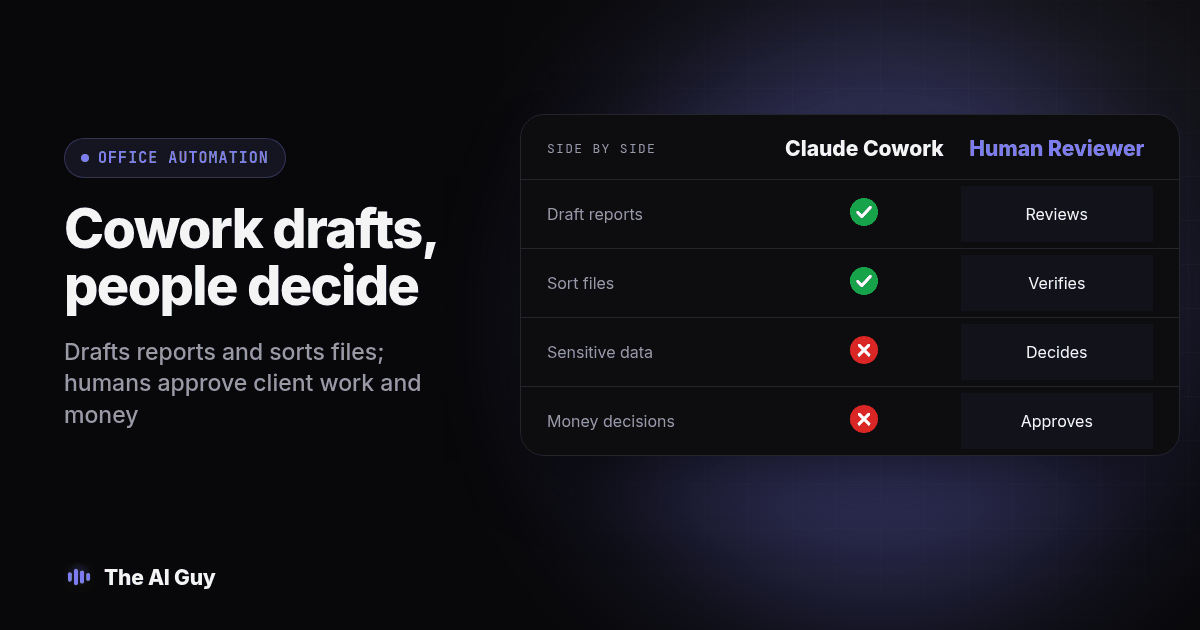
TL;DR: Claude Cowork can read a shared folder, cross-reference what is in it, and turn scattered notes into a drafted report, a spreadsheet, or a first-pass summary without you prompting it step by step. It can take over some repetitive drafting and file cleanup, not the part that requires judgment about what is sensitive, how something should sound to a client, or anything touching money.
The useful hiring question is how much work remains after the draft arrives. Someone still has to choose the inputs, check the output and take responsibility when a client asks why something happened. This guide compares those responsibilities and gives you a proposed test to run before changing anyone's role. It is not a report of measured savings or a claim that we tested Cowork on customer files.
What Is Claude Cowork, and Has It Actually Shipped?
Yes. Anthropic's setup guide describes Cowork as a way to complete multistep work and produce documents, spreadsheets and organized files. It is available on paid Claude plans. That supports trying it on a defined office task, but does not establish that it can take responsibility for an assistant's whole job.
The interface depends on your account and rollout. Anthropic's guide to desktop, web and mobile explains the available surfaces and access differences. Check your own account before writing a team procedure around a particular button or screen. Local file access needs the desktop app; a task started on another surface should not be assumed to have access to every folder on your computer.
Our piece on what separates an AI agent from a chatbot explains the buying distinction. For this decision, ask whether the tool can carry a defined task through several steps and return something you can inspect. Then ask who handles missing information, conflicting instructions and the final approval. Those questions separate useful drafting help from the broader responsibility you hire a person to carry.
What Does Claude Cowork Actually Do With a Shared Folder?
On desktop, you can grant access to a selected local folder and describe the result you want. Keep the first task narrow enough that you can compare the output with the original files. Anthropic's own setup guide walks through granting folder access and the permission choices that come with it, and how to review the actions it proposes.
From that folder, Cowork can draft a report from a week of scattered meeting notes, build a rough spreadsheet from numbers that are already sitting in your files, rename a folder of documents into something consistent, or write a first pass at a summary of a long document nobody has time to read closely. Those are possible uses, not promised results. You may need to clarify the request, correct a misunderstanding or stop a run. Judge the result by whether it meets your written instructions and how much checking it leaves for your team.
What Work Could This Take Off a Part-Time Assistant's Plate?
Here is the part worth being specific about, since a vague claim that "AI helps with office work" tells you nothing you can act on. These four tasks are reasonable candidates for a supervised trial:
- Drafting a weekly or monthly status report from notes, emails and call summaries that already exist, so a person edits instead of starting from a blank page.
- Naming and sorting files consistently across a shared folder, catching the duplicate "final_v2" and "final_v3" mess that builds up without anyone noticing.
- Writing a first-pass summary of a long customer thread, a meeting transcript, or a vendor contract's plain terms, flagged clearly as a draft a person still has to read.
- Pulling numbers that already live in spreadsheets or documents into a new rough spreadsheet, formatted the way you asked, without you retyping anything.
Every one of those tasks shares a property: the work is repetitive, and a wrong first attempt is cheap to catch and fix. That is the same lens our piece on choosing a virtual assistant or an AI agent uses to sort any task before deciding who should own it, and it holds up just as well for a named product as it did for the general question.
What Can Cowork Never Be Trusted to Decide Alone?
The tasks that stay with a person share the opposite property: a wrong call is expensive, and the mistake is not obvious until someone outside your business notices it. Three categories sit here, and they are worth naming plainly rather than hand-waved as "use good judgment."
The first is deciding what is sensitive enough to leave out of a report. A folder full of client files does not sort itself into "fine to summarize for the whole team" and "should never leave this one person's inbox." That call depends on context Cowork does not have: which client is touchy about their information, what got said off the record on a call, what a competitor could use against you if it leaked. Before connecting a CRM or financial records, ask whether the task needs that information at all. The honest answer does not change by brand name. You decide what goes in the folder before you decide how much to trust the tool reading it.
The second is tone on anything client-facing. A draft email to an unhappy customer can read as accurate and still land badly, because the words that matter are the ones that signal you understand why they are upset, not just the facts of the resolution. That read is a person's job every time.
The third is anything touching money or a signed agreement. A rough spreadsheet for internal planning is one thing. An invoice, a contract clause, or a number that goes on an actual bill to a client needs an owner's eyes before it moves, the same way a coding agent building a company's core systems from scratch, instead of a proven platform, is a decision our sister site MetaTechAi walks through for choosing between a custom CRM and GoHighLevel. The pattern repeats: a drafting tool is not an approval authority, no matter how confident the draft reads.
Claude Cowork or a Part-Time Assistant: Where Does Each One Actually Win?
| Task | Candidate work for Cowork | What still needs a person |
|---|---|---|
| Drafting a weekly status report from existing notes | Prepare a draft for review | Check completeness, facts and tone before sharing |
| Sorting and renaming files in a shared folder | Propose or apply a naming scheme to copies | Check every changed path during the pilot |
| Summarizing a long customer complaint thread | Draft only | Person decides what to say back and how |
| Writing a client-facing email about a problem | Draft only | Person approves tone and every fact in it |
| Deciding what is too sensitive to include in a shared report | No | Person decides what gets redacted, every time |
| Reviewing or approving an invoice, quote or contract clause | No | Owner reviews before anything moves |
| Designing the business's core systems, like a CRM or pricing logic | Draft requirements or prototypes only | Owner designs it, a person or vendor implements it |
Read that table as a starting point for your own list, not a universal rule. The column that matters is the right one: what still needs a person, every single time, regardless of how good the draft looked.
How Do You Test Claude Cowork Before You Trust It With Real Files?
Treat this the same way we recommend testing any AI tool before it touches live work: trust the output only after you have checked it against something you already know. Here is the procedure, in order.
- Create a dedicated test folder with non-sensitive copies or fictional files. Keep the originals outside the connected folder and keep a backup, so changes in the test do not alter your working records.
- Give it one task where you already know the correct answer, like a status report covering last week, which you can write from memory and compare line by line.
- Compare its file naming and folder structure against your own habits before letting it touch a folder your team relies on daily.
- Hand it a fictional document with one detail explicitly marked private, and check whether that detail shows up in the summary it produces.
- Ask it to draft a client-facing email about a real, resolved situation, and read it the way the client would, not the way you would.
- Check its math on any spreadsheet it builds against the source numbers, cell by cell, the first several times.
- Record the folders and tools it could access, the approvals requested and the changes it made. Verify permissions in the app or connector itself; an instruction saying "do not edit" is not an access control.
- Only after steps one through seven come back clean should you consider a limited live pilot with non-sensitive files, a backup and a named reviewer. Passing this test does not establish that every future run will be correct.
Skipping straight to step eight is how a drafting tool quietly becomes the thing making decisions nobody signed off on.
Keep a simple test record: task, input filenames, expected result, actual result, corrections, reviewer and pass or fail. Add preparation and review time to the time spent running the task. A quick draft that takes longer to repair than to write is not a useful handoff.
What Should You Check Before You Give It Folder Access?
Copy this into your own notes before you connect a real business folder. Anthropic's safety guidance recommends selective access and backups, and explains that file contents can contain malicious instructions. Treat anything inside a document as material to analyze, not permission to broaden the task.
- Review the actual folder and connector permissions available in your account. Start with a dedicated test folder, use restricted permissions where available, and require approval for consequential actions.
- List what is actually inside the folder: client names, financial figures, anything under an NDA, and decide now what gets moved out before you connect it.
- Name one person who reviews every client-facing draft before it sends, and write that name down rather than assuming "someone will catch it."
- Set a rule that no invoice, contract term, or price change moves without the owner's sign-off, no matter how finished the draft looks.
- Pick a folder you can afford to be wrong about for the first month, not the one your biggest client lives in.
- Decide in advance how you will know if something went wrong, since a quiet mistake in a shared folder can sit unnoticed far longer than a mistake buried inside a single email ever would.
Should a Business Already Using ChatGPT Switch Just for This?
Probably not on this feature alone. If your team already runs on ChatGPT and nothing is broken, Cowork is not a strong enough reason by itself to move everything over, and the real switching cost is usually the context your existing assistant already has, not which company's name is on the product. Our piece on weighing a switch from ChatGPT to Claude for business walks through what actually gets lost and gained in a move like that.
What Cowork does change is the calculation for a business that has not picked a primary AI tool yet, or one that is already frustrated with how much step-by-step prompting a chatbot needs for ordinary office work. An agent that can sit with a folder and come back with a finished draft is a different kind of tool than a chat window, even when both happen to be made by the same company.
For the connection decision, our comparison of MCP and API access for a small business helps separate the connection itself from the work you want it to perform.
What Are the FAQs About Claude Cowork and Assistants?
Is Claude Cowork included in a Claude subscription, or is it billed separately?
Cowork is available within paid Claude plans. Check the current plan documentation and your workspace settings before relying on a particular capability, because availability and usage limits can vary. Treat the subscription as access to a tool, not a commitment that it will finish a certain amount of assistant work.
How long does it actually take to get Claude Cowork working on our files?
Setup time depends on your files, permissions and task. As a planning suggestion, allow a week or two to test work whose correct result you already know. Move forward when the outputs meet your review standard, not simply because that testing period has ended.
Can Claude Cowork connect to tools like our CRM or Google Drive, or only local files?
Local folder access and connected business tools are different access paths. Check whether a supported connector exists for the service you use, what it can read or change, and whether your plan or administrator allows it. Do not assume that selecting a folder also connects your CRM or Google Drive.
Is it safe to give Claude Cowork access to a shared folder with customer or financial information?
Start with non-sensitive copies or fictional records, and keep customer and financial information out of the pilot. Decide what the task actually needs before granting access. A correct summary does not prove safe data handling, and a written instruction to keep information private does not replace permissions and review.
If we already pay a part-time assistant, do we replace them with Cowork or run both?
Run both, at least at first. Cowork takes the repetitive drafting and sorting off your assistant's plate so their hours go toward judgment calls, client relationships and the exceptions a folder of files cannot resolve on its own.
What Should You Do Next?
Start with a copied folder and one task you already know the answer to, not your busiest client's live files. Run the eight-step test above before this touches anything that matters, and write down the one rule that covers money and contracts so it does not quietly depend on someone remembering to check it twice.
If you want a second opinion on where Cowork actually fits in your specific setup, and where it does not, contact us and describe what a part-time assistant currently handles for you. We will tell you plainly which parts of that job are ready to hand off and which parts should stay with a person.