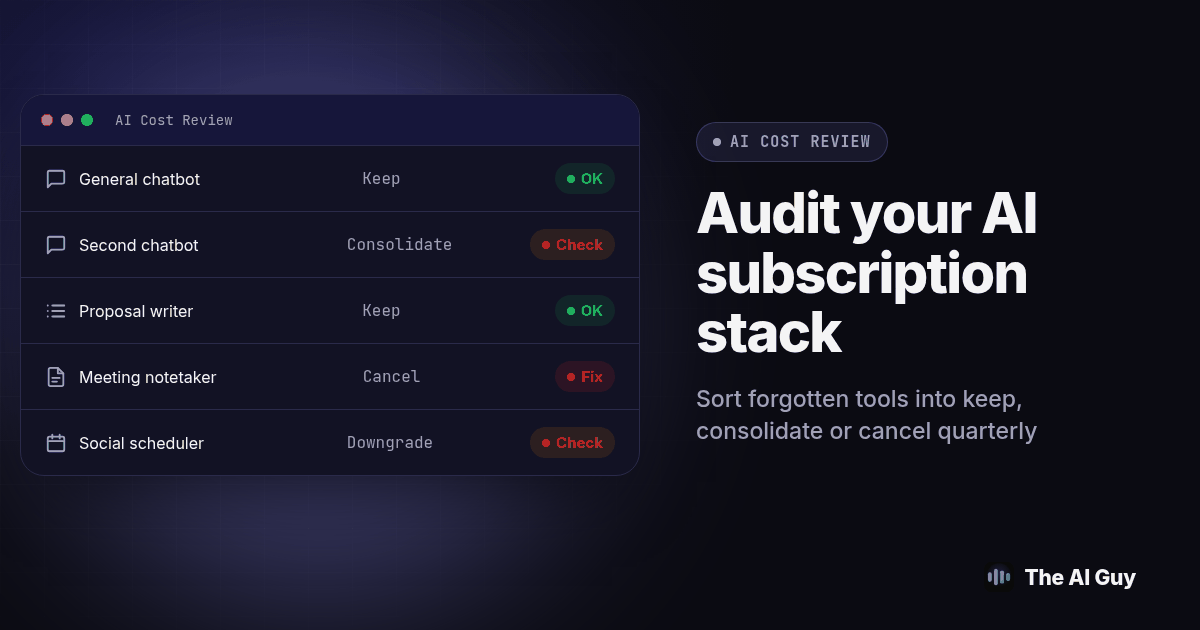
Pull three months of bank or card statements, check actual usage and connected workflows, then sort each AI subscription into keep, consolidate or cancel before renewal. Add an annual renewal check, export needed records and test replacements before removing access.
If you want to audit AI subscriptions your small business already pays for, start with a short usage log and evidence of completed work. The procedure below is a suggested quarterly review, not a promise that every business can cut its stack or finish in one sitting.
Why Does a Small Business End Up Paying For Tools Nobody Opens?
Nobody sets out to collect AI subscriptions. A free trial for a transcription tool converts to a paid plan nobody remembers agreeing to. A designer adds a writing assistant for one project and never removes it from the card. A manager signs up for a research tool at a conference, uses it twice, then forgets it exists. Each decision was reasonable alone; the stack problem shows up only once you add them together.
It is also easy to undercount what you are actually running. A promotional Entrepreneur article about managing multiple AI subscriptions frames fragmented subscriptions as a business problem. Treat that as commercial commentary, not independent research proving how much your team wastes. Your own billing records and task results should decide what stays.
This is a cost review, not a verdict on whether your business should use AI. See which business tasks to automate with AI first if that earlier question is the one you are facing. Here, we assume the tools already exist on your statement and ask which still deserve a line item.
What Do Three Months of Statements Actually Show Us?
Start with the card and bank statements, not your memory of what you signed up for. Memory misses the tool a former employee added, the plan that auto-upgraded after a trial, and the annual charge that only shows up once a year and feels invisible the other eleven months.
Pull the last three statement cycles for every card anyone on the team uses for software. Three months catches monthly charges twice over and surfaces anything billed quarterly, which one month would miss. Highlight every line that looks like software, then match it to an actual product name, not a merchant descriptor that reads like a string of letters.
The AI Tools Mentor audit checklist likewise recommends checking statements, expense reports and app store subscriptions before grouping overlapping tools. Its spending estimates are not a benchmark for your business. Extend your own check to the previous year of invoices or a renewal register so annual subscriptions outside the three-month sample are not missed.
How Do We Log the Last Time Each Tool Was Actually Opened?
A subscription earning its place shows activity, not just a login from months ago. For each tool, open the admin or billing dashboard and look for a usage log; availability and detail vary by vendor and plan. Include API activity and background runs, since useful automation may work without anyone opening the interface. Record the last date someone actually used it, not the date the account was created.
Where the dashboard does not show usage clearly, ask directly. Message whoever added the tool and ask when they last opened it; "last opened," not "do we still need this," since the second question invites a defensive yes. If nobody can name a specific week, treat that silence as data.
Use sixty days without a recorded task as a suggested review trigger, not an automatic cancellation rule. Seasonal work and emergency fallback tools need a different test. Ask the owner to identify the next expected use and explain what would happen without the tool. Mark missing evidence as unresolved until dependencies have been checked.
How Do We Sort Every Line Into Keep, Consolidate or Cancel?
Once you have the statement list and the last-opened date beside each one, sort every row into exactly one of three buckets. Resist a fourth "maybe later" bucket; it is where canceled subscriptions go to survive another quarter.
Keep means the tool has a recent, specific use in the last thirty days, a clear owner who can describe what it does, and no other tool on your list doing the identical job. If you have measured the time it actually saves against a manual version of the same task, using the method described in our guide to measuring time saved by AI, that evidence belongs in the keep column too.
Consolidate means two or more tools on your list solve the same problem for different people. A writing assistant and a chatbot's writing mode might both draft customer emails; a meeting notetaker and a video platform's built in transcription might both summarize the same call. Pick the one with the widest coverage across your actual tasks, move everyone onto it, and cancel the runner-up once the switch is confirmed working, not before.
Cancel means no verified ongoing need after checking seasonal work and dependencies, or a use case fully covered by a tested replacement. Treat sixty days without use as a review trigger. Cancel candidates are usually the easiest decision on the sheet precisely because nobody can name the last time they opened the tool.
What Are the Exact Steps to Run This Audit This Week?
Work through this procedure in order. It assumes a stack of roughly five to ten tools; a larger stack just means more rows on the same sheet.
- Pull three statement cycles. Export or screenshot the last three months from every card and bank account used for software, and list every recurring charge that could be AI related, including ones billed through an app store or a reseller.
- Name the actual product behind each charge. Match merchant descriptors to real product names. If a charge is unclear, search the exact amount and descriptor, or ask whoever has an account with that billing pattern.
- Log the last-opened date for each tool. Check the vendor's own usage dashboard first, then ask the team member who added it if the dashboard does not show activity clearly.
- Note the renewal date and cancellation notice window for each tool. Check the actual contract and billing settings for both annual and monthly plans. Ending renewal is not the same as receiving a refund or deleting an account.
- Sort every row into keep, consolidate or cancel. Use the criteria above. Write one sentence next to each decision explaining why, so the next person who reviews the sheet does not have to redo your reasoning.
- Export and test before you cancel anything. Download needed history, prompts and templates, then open the exports. Run a representative task through the replacement and check its output, permissions and downstream handoff. Keep the original available until this test passes.
- Cancel in order of renewal date, starting with the soonest. Cancel inside the vendor's notice window, confirm the cancellation in writing, and save that confirmation with your audit sheet.
- Put the next audit on the calendar now. Set it for roughly a week before your next major renewal cluster, not a random date three months out.
What Does Trimming a Five Tool Stack to Two or Three Actually Look Like?
Here is a worked example. The tools, team and numbers below are a hypothetical illustration of the method, not a reported client outcome.
A five person service business is paying for five AI tools: a general chatbot assistant, a second chatbot a different team member prefers, a dedicated writing assistant for proposals, a meeting notetaker, and a social post scheduler with a built in AI caption writer. Running the audit above produces this sheet.
| Tool role | Last opened | Overlaps with | Decision |
|---|---|---|---|
| General chatbot assistant (owner's account) | This week | Second chatbot below | Keep |
| Second chatbot (added by a team member) | Six weeks ago | General chatbot | Consolidate into the one above |
| Proposal writing assistant | This week | Nothing on the list | Keep |
| Meeting notetaker | No manual or background use verified | No seasonal need or dependency found | Cancel after export |
| Social scheduler's AI caption writer | Weekly, but only the scheduling feature | Not an AI overlap; the AI add-on specifically is rarely used | Keep the scheduler, downgrade off the AI add-on tier if a lower tier exists |
Assuming the replacement test passes and the scheduler offers the required downgrade, the result is two full AI subscriptions kept, one consolidated away, one canceled outright, and one add-on downgraded rather than dropped entirely. That is a five tool stack trimmed to two core AI tools plus a scheduler running without its AI upsell. Nothing here required replacing a tool with a worse one; it required confirming which tools were actually doing distinct work.
Use a shared worksheet with columns for tool, owner, last completed task, renewal date, notice deadline, dependencies, export status and decision. Keep the supporting invoice or usage report beside each row. That gives the next reviewer evidence to revisit rather than a verdict they must accept on trust.
Could Canceling Four Tools Trade Us Into One Vendor's Lock-In?
This is the caution that belongs right next to the audit, not an afterthought. Consolidating five tools down to one assistant for every writing task feels efficient until that one vendor raises its price, changes a feature you depend on, or has an outage during your busiest week. The sprawl problem and the lock-in problem are opposite failure modes of the same underlying issue: nobody mapped what each tool actually does before deciding how many to run.
Before you consolidate two overlapping tools into one, check what happens if that tool disappears. Can you export prompts, templates and saved work in a format you could move elsewhere? Does the vendor publish an API or a connector standard, or is your workflow trapped inside their interface? Our explainer on MCP versus API access covers how to tell whether a connection method ties you to one vendor or just to one account.
Billing structure matters here too. If your stack includes calling software, RizzDial's guide to AI dialer billing models provides context for questions about usage and account charges. Confirm current terms directly before making a decision. For this audit, record which charges continue when people stop logging in and which change with workload. Do not assume that canceling a user subscription also ends a separately billed service.
Keeping two overlapping tools is occasionally the right call when the second one is cheap, serves a genuinely different workflow, and works as a fallback. Consolidate when the overlap is real and the fallback cost is low, not just because a sheet says you should.
What Should We Ask Each Vendor Before We Cancel or Consolidate?
Use this request before you cancel a tool with any saved history, or before you move a whole workflow onto a tool you are about to rely on more heavily.
We are reviewing our AI tool subscriptions this quarter. Before we cancel or downgrade this account, please confirm: how long our workspace data, chat history and saved templates stay available after cancellation, whether we can export that data in a standard format, what notice is required to avoid an auto-renewal charge, and whether canceling affects any connected integration, webhook or API key tied to this account. Please respond before our renewal date on [date].
Send that to each vendor on your cancel or consolidate list and keep the replies with your audit sheet. A vendor who cannot answer those four questions quickly is telling you how hard a future switch will be.
How Do We Keep This From Becoming Another Forgotten Subscription?
An audit that runs once and never again just delays the problem by a quarter. Put a recurring date on the calendar, owned by one named person, set roughly a week before your biggest renewal cluster.
The payoff is not just avoided charges. Keep a record of accepted outputs, review time and failed handoffs for the tools you retain. At the next audit, compare those records with the reason you kept each subscription. A tool that stays busy but creates substantial correction work may need a smaller role, better instructions or replacement.
If your current stack started because you were told to adopt a tool before you had a clear task for it, it is worth re-reading our guide on where to start with affordable AI for a small business before your next renewal. Starting with one clear task and a cheap or free tier, instead of a full subscription for a capability you have not tested yet, is the cheapest version of this audit: never adding the line item in the first place.
What Are the FAQs About Auditing an AI Subscription Stack?
How long does the first AI subscription audit actually take?
Schedule an initial session to gather statements, usage records and renewal terms, then allow follow-up time for missing owners or vendor answers. The duration depends on account access, the number of tools and connected workflows. A later quarterly review can reuse the worksheet, but do not rush dependency tests to meet an arbitrary time target.
What happens to our data if we cancel an AI subscription?
Export chat history, saved templates and custom instructions you need before canceling. Cancellation, account deletion and downgrading can have different effects, so check the specific vendor's current retention and export terms. Confirm that exported files open correctly and contain the records you need; do not assume a standard grace period.
Will canceling a tool break automations or integrations we already built on it?
Possibly, so check connected workflows first. Search your automation platform, CRM webhooks, and any Chrome extensions or Slack apps tied to the account you are about to cancel, and test the downstream workflow in a staging or duplicate version before the real cancellation goes through.
Is this the same decision as whether to adopt a new AI chatbot or tool?
No. Adopting a new tool is a forward looking decision about whether a capability is worth paying for at all. This audit is a backward looking cost review of tools your business already pays for every month, aimed at finding the ones nobody opens anymore and the ones doing the same job twice.
Where Do We Go From Here?
Pull your statements this week, not next quarter. A sheet with five rows and an honest last-opened date next to each one will tell you more about your real AI spend than another thirty minutes of guessing from memory. If you want a second set of eyes on the sheet once it is filled in, contact us and we will walk through the keep, consolidate and cancel calls with you before your next renewal date hits.