Quick answer: Start with one free AI assistant on one repeated task, such as drafting, research or meeting notes. Time that task before and after for two weeks, including every minute of checking and correction. Consider a paid plan or done-for-you setup when a specific limit, permission requirement or integration need prevents useful work.
If you run a very small business, the useful starting question is what AI can help you do before you commit to another bill. ChatGPT, Claude and Gemini offer access without a paid subscription, as their official plan documentation linked below explains. For a solo owner or a small team, that creates room to test an ordinary task before deciding whether a subscription or implementation project is justified.
This is not a pitch to skip spending money forever. It is a plan for spending it in the right order: free tool first, on the task that actually costs you the most hours, measured for two weeks, and only then a paid tier or a done-for-you AI setup if the free version is genuinely the thing holding you back.
What should a very small business actually try first, before paying for anything?
Pick one tool and one task, not three tools and five tasks. Trying everything at once is how a two week trial turns into a scattered month with nothing measured. Start with whichever free assistant you are already a little familiar with, ChatGPT, Claude or Gemini, and pick the task that currently takes you the longest every single week.
Consider three candidate tasks: writing something (emails, proposals, social posts, job descriptions), researching something (a competitor or supplier), or turning existing notes into next steps (a client call, a team meeting, a walkthrough with a new hire). These are starting suggestions, not a claim that every owner spends the same amount of time on them. Choose from your own calendar and work queue, then judge the result against the version you would actually use.
Resist the urge to sign up for all three assistants on day one. Comparing three tools on five tasks makes it harder to track what changed. One tool on one task gives you a clearer starting comparison. If the results are still mixed at the end of week two, keep measuring before making a purchase.
Which tasks actually save the most hours, and which should you test first?
Rank your own week honestly before you touch a keyboard. Use these three categories to look for a repeatable task in your own week:
- Drafting. Customer emails, proposals, job postings, social captions, website copy. If you write more than a handful of these a week and each one takes fifteen to thirty minutes to get right, this is a candidate worth timing first.
- Research. Checking a competitor's pricing page, summarizing a regulation that applies to your industry, comparing two vendors before a purchase. This is slower to notice as a time sink because it feels like normal work, not a task, but it adds up fast for an owner who is also doing sales and operations.
- Meeting notes. Turning a client call or a team huddle into a clear summary and a task list. This one is easy to underrate until you add up the time spent re-listening to a recording or re-reading your own scrawled notes a day later.
Pick whichever of the three is costing you the most real hours this month, not the one that sounds the most impressive to automate. For example, imagine a five-person team spending six hours a week on client emails and one hour on research. That team has more drafting time available to reduce. That hypothetical comparison does not guarantee savings; output quality and review time still decide the result.
How do the free tiers of ChatGPT, Claude and Gemini actually differ?
All three give you a way to try AI without a paid subscription, but their feature boundaries differ. OpenAI's Free Tier FAQ lists web search, file uploads and data analysis, with separate limits for some tools. Claude's plan comparison lists chat, web search, file creation and app connections on Free. Google's Gemini limits guide distinguishes access without an AI plan from paid plans with expanded limits.
| Tool | A practical first test | What to check before depending on it |
|---|---|---|
| ChatGPT | Draft a reply or research a supplier using web search, then open the cited sources | File uploads and other tools have their own limits; check the current Free Tier FAQ |
| Claude | Turn approved notes into a draft or action list; try web search when sources are needed | Check current usage limits and whether your required app connection is available |
| Gemini | Draft from approved notes or explore a research question in your Google account | Account type, feature availability and usage limits matter; personal and work accounts differ |
The suggested tests in this table are editorial starting points, not benchmark results. Run the same task with the same input and acceptance checklist if you later compare tools. A polished answer on an easy example does not tell you which assistant will handle your normal work with less correction.
Check the linked provider pages before starting because plans and limits can change. Do not assume that free means text only or that paying automatically supplies every integration. A connector being listed also does not prove that it can update the exact record you need. For this first trial, manual input keeps the task easy to inspect and the result easy to reverse.
How do you run a two week free AI trial without wasting the first week?
One bad response is not enough evidence to abandon a tool, and endless prompt editing is not a useful trial either. Use this original eight-step procedure to reach a practical decision. Two weeks is a suggested evaluation window, not a guarantee of measurable savings.
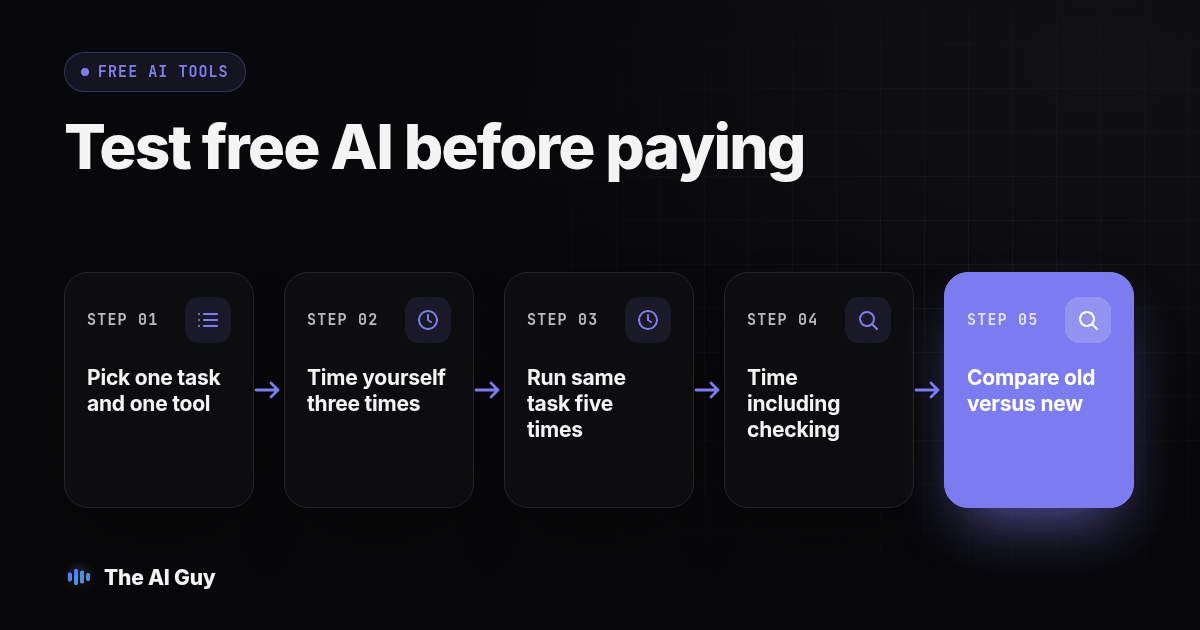
- Pick one task and one free tool. Not three tools, not five tasks. One of each, chosen from the ranking you did above.
- Time yourself doing the task the old way, three separate times, before you touch the AI tool. Write the minutes down. This is your baseline, and skipping it leaves you without a comparison for deciding whether anything changed.
- Write one plain-language prompt template for the task and save it somewhere you will find it again, a notes app, a pinned document, anywhere but your memory.
- Run the same task through the free tool for five real instances across the first week. Use real work with identifying and confidential details removed, and only inputs your business has approved for the tool.
- Check every single output against what you would have written or found yourself, before you send or use anything. This check can catch a wrong name, a made-up detail, or a missed deadline.
- Time the AI-assisted version of the task, including the time you spend checking it. Checking time counts. For example, two minutes of generation plus ten minutes of correction is twelve minutes of work; compare all twelve with your baseline.
- Repeat for the second week, adjusting your prompt template once based on what you learned in week one, not every single day.
- At the end of two weeks, compare average minutes per comparable completed task: old way versus AI-assisted way, including every minute spent checking. Compare quality too, and record setup time separately. Unequal batch sizes should not be compared using raw totals.
Keep a simple two-column log for this, date and old-way minutes in one column, date and AI-assisted minutes (checking time included) in the other. You do not need software for this; a shared spreadsheet or even a page in a notebook works, as long as you actually write the numbers down instead of trusting memory.
For an email trial, save a prompt like this: "Draft a short reply using only the facts below. Keep the next action clear. If a date, policy or commitment is missing, ask me instead of filling it in." Then supply a cleaned version of the request and your approved facts. This is a starting template, not a promise that the assistant will follow every instruction perfectly.
Before running it, write a small acceptance checklist: correct request, accurate facts, appropriate tone and no invented commitment. Mark each result usable, needs edits or rejected. If the assistant invents a delivery date, that result needs correction even if the wording sounds convincing. Keep the rejected run in your log, because removing failures makes the trial look easier than the real workload.
How do you know whether the free tool actually saved you time?
The two week log above is the honest version of this question, and we have a full walkthrough of the measurement itself, including the traps that make a tool look faster than it is, in how to tell if AI is actually saving your business time. The short version: time the task, not the tool, and count rework separately from the first draft.
In a hypothetical example, a free AI tool that cuts fifteen minutes off a weekly email but adds twenty minutes of correcting a wrong client name or a made-up detail has not saved your business anything. It has moved the cost from writing to checking. Measuring both sides is the only way to tell the difference between a tool that genuinely helps and one that just feels modern.
When have you actually outgrown the free tier?
You will know, because the limit will be specific, not a vague feeling that you "should probably upgrade." Three real signals that it is time to look past the free tier:
- You are hitting a usage cap on the same task every single week, not once in a busy month.
- The task now genuinely needs to connect to another system, your CRM, your calendar, your accounting software, and copy-pasting between windows is costing you more time than it is saving.
- Your two week log shows a real, measured time savings large enough that paying for more of it is an obvious decision, not a hopeful one.
If none of those three things has happened yet, stay on the free tier. There is no prize for upgrading early. Keep the trial narrow and revisit the decision when the workload changes. If sensitive information or team permissions become essential, review those requirements before expanding, even if you have not hit a usage cap.
What does the next step up actually look like once you've outgrown it?
If you are past the free tier on a specific task, the next move is usually a paid plan on the same tool, not a jump straight to a fully managed AI system. Before you spend anything, go back to choosing your first AI automation task and confirm the task you are scaling is actually the right one to invest in, not just the one you happened to test first.
Paid, done-for-you AI work is a real next tier, and it is priced differently than a consumer chat subscription because someone is building and maintaining a system for you instead of you typing into a chat window. If you want a sense of what that next tier of spending looks like in a different corner of AI, our sister site RizzDial breaks down what agencies actually pay for AI calling minutes in 2026, which is a useful comparison for understanding how paid, infrastructure-level AI pricing works even outside of calling.
When you are ready to talk through whether your business is actually at that point, or whether another few weeks on a free tier would tell you more first, talk to us. Bring your two week log. We would rather tell you to keep using the free plan for another month than sell you something you are not ready for yet.
What FAQs do small business owners ask before spending anything on AI?
What does affordable AI actually cost a very small business to start?
You can begin with a free tier rather than a paid subscription. ChatGPT, Claude and Gemini document access without a paid plan, subject to the limits described above. Your time still counts: preparation, review and corrections belong in the trial log. There is no universal point when a small business outgrows free access. Upgrade only when a specific restriction prevents a task that has already proved useful, or when your business needs different permissions or data terms.
How long does it take to set up a free AI tool and start using it?
Start by creating an account and choosing one approved task, but do not promise yourself a fixed setup time. Sign-in requirements, account access and your own preparation can vary. Open the chat and try a draft email or a set of notes without confidential details. Learning whether the tool helps consistently takes repeated attempts. The two week trial above is a practical schedule for that learning, not an account setup requirement.
Will a free AI tool connect to the software my business already uses?
Some free plans include app connections, so check the exact provider, account and integration instead of assuming every connection requires payment. Access to an app does not necessarily mean the assistant can edit your CRM, manage permissions or run a dependable unattended workflow. Confirm the specific action you need and who approves it. For the first task trial, manual copy and paste can be enough to measure usefulness before adding another moving part.
Is it safe to put business information into a free AI chatbot?
Treat a new AI tool as a vendor whose settings and terms need review before you share business information. For this starter trial, leave out customer personal information, financial account numbers and confidential material. Use public facts or approved notes with identifying details removed. Check retention, training controls, account permissions and deletion options for the exact plan. A paid label alone is not your business approving a tool or every possible use of its data.
What does it cost to switch from a free tool to a paid plan or done-for-you AI work later?
The effort depends on what you built around the tool. Saved prompts and a simple time log are easier to carry elsewhere than connected workflows, uploaded knowledge or account-specific settings. Keep your approved source material and prompt templates in files you control. Before switching, test those prompts again and check export options. Bring the trial evidence to any implementation conversation so the next system solves a measured problem instead of repeating the same experiment.