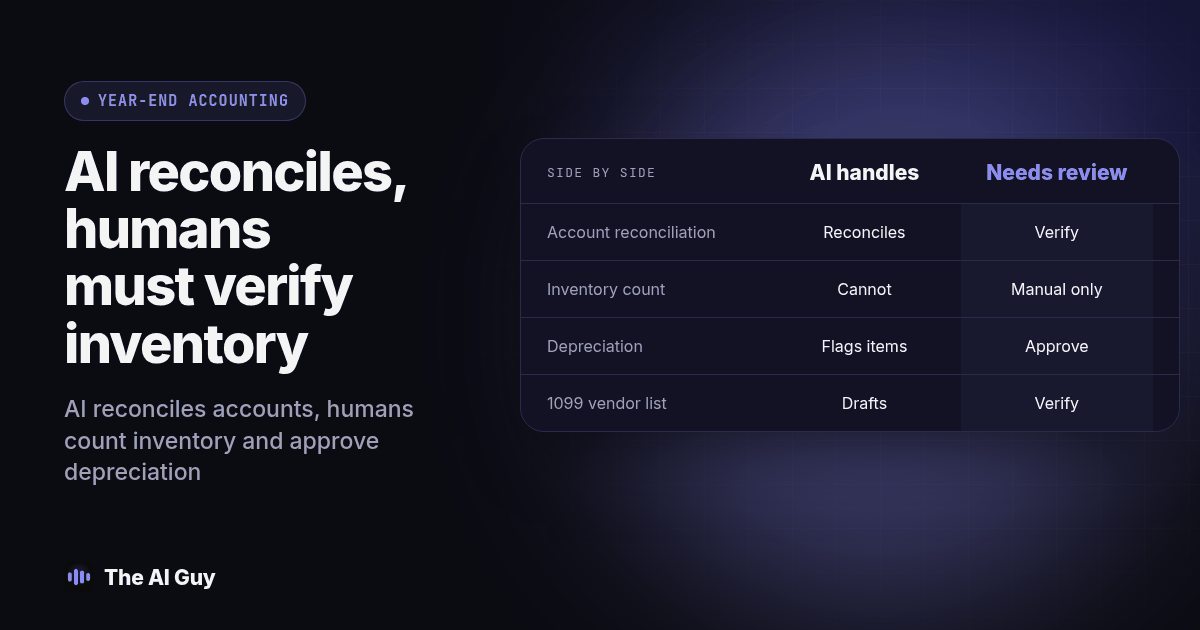
AI bookkeeping tools may suggest bank and card matches, flag duplicate or miscategorized transactions, and help assemble a draft 1099 vendor list before December 31. They cannot walk your warehouse to count inventory, decide how to depreciate an asset, or confirm your sales tax filings match what you collected. Run the AI-assisted review first, then hand the inventory count, depreciation decision, and filing checks to your bookkeeper before closing the file.
Small business owners often ask which parts of a year-end close AI can help complete and which decisions still need a person. A tidy dashboard is not proof that the books are correct. Each proposed entry needs to trace to a statement, document, physical count, or filing, and someone responsible for the books needs to review it.
Key takeaways
- AI can assist with reconciliation, categorization, and anomaly review, but it does not replace a physical count or a depreciation decision.
- 1099 preparation is a draft, not a filing-ready form, until a person confirms worker classification, payment coverage, and current reporting requirements.
- Sales tax reconciliation needs a person to match the books against returns and payments actually made in each relevant jurisdiction.
What belongs on a year-end books close checklist?
A useful close checklist covers ten jobs. Current closing guides such as Orbit Accountants' checklist and Beancount's year-end guide describe similar areas, though the order and terminology vary by business and accounting method.
- Reconcile every cash account through December 31. Compare bank, savings, credit card, loan, and payment processor records with their statements, not only a bank feed total.
- Review uncategorized transactions and suspense accounts. Resolve items with evidence and document balances that remain instead of forcing a category to empty a holding account.
- Review receivables and the aging report. Identify disputed or potentially uncollectible balances for your bookkeeper to assess under your accounting method.
- Record unpaid December bills in the right period. Ask your bookkeeper whether an expense should be accrued when the work happened even if the invoice arrives later.
- Review accruals, prepaids, and deferred revenue. These adjusting entries depend on your accounting method and the terms of customer agreements.
- Count inventory physically on or near December 31. Record what is on hand and have a responsible person decide how damaged or obsolete stock should be treated.
- Reconcile the fixed asset list and depreciation. Add items bought during the year, remove items sold or scrapped, and ask your tax professional about treatment.
- Reconcile sales tax collected against filings and remittances. Review each state or jurisdiction where you have a filing obligation.
- Prepare information return drafts and verify payroll reports. Review 1099 forms and compare W-2 totals with payroll filings, with current requirements confirmed by your tax professional.
- Lock the period after review. Follow your accountant's process so later edits do not silently change the records they are reviewing.
The list is a starting point, not a universal accounting treatment. Your business structure, accounting method, inventory practices, locations, and tax situation change which entries or filings apply.
Which close tasks can AI bookkeeping tools help with?
Reconciliation support, categorization suggestions, and anomaly flags are sensible tasks to evaluate first. They can make a review queue easier to work through, but they do not establish that a transaction is correct. Check the specific product and your account setup instead of assuming every tool works the same way. Intuit provides general background on accounting automation and AI, but feature availability varies by product.
Steps one and two are candidates for assisted review. A bookkeeping tool may suggest matches, categorize transactions, and surface items needing attention. Review the output against the relevant account statements and source documents. For a hands-on review sequence, see our guide to checking AI bank matches.
Accruals and prepaids are a partial fit. AI may flag a possible missing accrual, but it cannot determine how much deferred revenue to recognize under a multi-month agreement without an agreed accounting treatment and complete records. Identifying a question can be the tool's role; approving an entry belongs to the responsible reviewer.
| Close task | What AI may help prepare | What still needs review |
|---|---|---|
| Bank and card reconciliation | Suggest matches and surface unmatched items | Compare balances with statements and resolve transfers, duplicates, and timing differences |
| Categorization | Suggest an account based on transaction history or details | Confirm business purpose and treatment, especially for new or unusual items |
| Receivables and payables | Organize aging lists and flag overdue or unpaid items | Decide whether balances are collectible, disputed, accrued, or recorded in the right period |
| Inventory | Compare recorded quantities or costs and flag unusual changes | Count stock and decide how to handle damaged or obsolete items |
| Fixed assets | Identify possible additions from recorded transactions | Confirm the asset list and have a qualified person select applicable tax treatment |
| 1099 preparation | Assemble a draft from recorded vendor payments | Confirm payee details, payment coverage, classification, exceptions, and filing requirements |
| Sales tax | Compare recorded collections with available reports | Match the books to returns and remittances for each relevant jurisdiction |
This table compares responsibilities, not measured product performance. Software capabilities depend on the product, integrations, and data available to it.
Where does AI reconciliation need a human check?
A clean dashboard and a clean set of books are different things. A suggested match does not confirm that a record is correct, and a plausible category based on a vendor name does not tell you what was purchased or how your bookkeeper wants it treated.
The year-end rule is similar to the review in our guide to AI invoice extraction: check whether a December transaction is a transfer between your own accounts, a split that needs multiple entries, or a duplicate deposit reported by both a payment processor and your bank feed. The particular issues depend on how your accounts and integrations are configured.
Hold ambiguous items rather than forcing a decision to clear the queue. A held transaction with a note gives your bookkeeper a question to resolve. A wrongly accepted entry can require correction after review has begun. See our practical bank match review procedure for an example of how to record evidence and outcomes.
Can AI count inventory or calculate depreciation?
No. AI can flag that cost of goods sold looks unusual compared with other periods, but it cannot walk a stockroom and count what is on the shelf. A person needs to perform the physical count, document it, and have the appropriate reviewer decide how to treat damaged or obsolete stock. Orbit Accountants and Beancount both include a physical count in their closing guidance.
Depreciation also needs review. AI may flag a recorded equipment purchase that is missing from a fixed asset schedule, but the correct treatment depends on your facts and current tax rules. Orbit Accountants discusses a de minimis threshold as a possible treatment for some purchases; confirm whether any rule applies to your situation with your accountant rather than relying on a software suggestion.
Treat both as human review items: use AI to remind you that they exist or surface a possible gap, then have a responsible person make and document the decision.
Can AI prepare accurate 1099s by itself?
It can help draft them, which is not the same as filing them. A tool with vendor payments recorded throughout the year can assemble a candidate payee list and totals. That draft only reflects information in the books, so it may miss a contractor paid by a personal check or a vendor whose late invoice changes the year's total.
For qualifying payments made in 2026, the IRS states that the information reporting threshold for certain payments, including Form 1099-NEC, is $2,000. Other rules and exceptions apply, including backup withholding, and payment type affects which information return is used. Confirm the requirements for your situation with the IRS small business information return guidance and your tax professional before preparing forms. Worker classification is a separate decision: payment patterns alone do not establish whether a person is an employee or contractor. Our article on whether AI can do small business taxes explains why those decisions need review.
Treat a software-generated vendor list as a starting roster. Compare it with your vendor records and other payment sources, then verify payee details, classification, applicable forms, and current instructions before filing.
How do you reconcile sales tax before the books close?
Sales tax reconciliation compares what you collected, what you filed, and what you remitted for each relevant jurisdiction. Orbit Accountants' guide treats this as a separate close step, rather than assuming a bank reconciliation will resolve it.
AI may surface a difference between books and filing reports. A person still needs to match that difference to the return and payment history, and determine whether it reflects a missed filing, a rate or coding issue, or another cause. Ask whoever files your sales tax how to correct any return already submitted. The correct process depends on the jurisdiction and the facts.
Which close tasks are AI-ready, and which need your eyes first?
Use this summary to assign review responsibility. Reconciliation is a useful place to start because a tool may suggest matches and flag items it cannot place, while a person checks transfers, splits, and duplicates. Categorization and anomaly detection work similarly: they can surface items, while the reviewer confirms the business purpose and treatment.
AI can organize aging receivables and unpaid bills, but a person needs to assess whether a balance is collectible or belongs in a particular period. Inventory and depreciation need human judgment and records outside the software's suggestions. A 1099 draft can save assembly work, but classification, off-book payments, and reporting requirements need review. Sales tax tools can reveal a mismatch, while the actual filings and remittances determine what it means.
The dividing line is not whether a task appears in a dashboard. It is whether the tool has the source records and authority needed to complete the decision, and whether someone checks the resulting books.
What should you hand your accountant at the start of the review?
Prepare a one-page handoff alongside the file. Fill it in as you close the books, then use it to tell your accountant what you checked and what remains unresolved.
``text Year-End Handoff Checklis
[ ] All cash accounts reconciled through December 31 (list open items and why) [ ] Uncategorized transactions cleared or listed with a question [ ] A/R aging reviewed; note disputed or potentially uncollectible items [ ] Unpaid December bills reviewed for correct period [ ] Physical inventory count completed on: ___________ (attach count sheet) [ ] Damaged or obsolete inventory reviewed: yes / no (attach note) [ ] Fixed asset additions and disposals recorded for the year [ ] Depreciation reviewed with: ___________ [ ] Sales tax collected vs. filed reconciled by jurisdiction (flag any gap) [ ] 1099 draft list reviewed against vendor and payment records [ ] Period locked in accounting software on: ___________ [ ] Open questions for accountant: ___________ ```
Hand over the checklist with the supporting file, not instead of it. It tells your accountant what you reviewed and where to focus. Avoid including unnecessary sensitive customer or vendor information in an unsecured note.
What questions belong in an AI bookkeeping year-end close FAQ?
How much setup time does AI bookkeeping cleanup take if I start this close to December 31?
Enough to be worth it, not enough to delay you. The time depends on how many accounts and transactions need review, how current your records are, and whether statements and invoices are available. If your accounts are not connected or the transaction backlog is large, estimate that cleanup with your bookkeeper before planning the remaining work. Depreciation and vendor reporting both depend on usable records underneath them.
Can AI prepare my 1099-NEC forms by itself, or do I still need to check them?
AI tools can pull vendor totals from categorized payments and draft the forms, but you still have to confirm each payee was actually a contractor and not an employee, that the totals match what you paid outside the books too, like a check written straight from a personal account, and that every vendor who crossed the reporting line this year is on the list. The software reads your ledger. It cannot see the handshake deal you made in March.
Will AI catch it if my inventory count is wrong?
No. AI bookkeeping tools can flag that your cost of goods sold looks unusual compared to prior months, but they cannot walk your warehouse or stockroom and count what is actually on the shelf. The physical count has to be done by a person, and the decision to write off damaged or obsolete stock is a judgment call your bookkeeper or accountant should sign off on, not a suggestion to accept and move past.
Is it a bad idea to switch AI bookkeeping tools this close to year end?
Usually, yes. A switch means re-importing history, rebuilding your categorization rules, and re-training whatever matching logic the new tool uses, and none of that is work you want happening while you are also trying to close the books. Finish this close in the tool you already have. If you want to evaluate a new AI bookkeeping platform, start that evaluation in January on a fresh period, not December.
Once AI has cleaned up my books, does my accountant still need to review everything before filing?
Yes. Ask your accountant what review they need before filing. AI-assisted cleanup can hand your accountant a file with fewer uncategorized transactions and a shorter exception list, which saves them time. It does not replace their review of your depreciation elections, your 1099 accuracy, or your sales tax position, because those are the exact decisions that carry your signature and your liability, not the software's.
What should you do right now, before December 31?
Run the checklist in order. Let AI assist with reconciliation and categorization, then pause for the human-only work: the physical inventory count, the depreciation decision, and the 1099 and sales tax verification. Fill out the handoff as you go, so your accountant starts with a file and a clear list of open questions.
If the wider challenge is coordinating AI across your operations next year, MetaTechAi's managed services team builds and runs systems for service businesses. That is separate from bookkeeping. For help thinking through the AI side of your close, contact AI Guy with your checklist and the point where you are stuck.