Sometimes recording law permits a participant to record without telling the other person, but you should not assume that makes an undisclosed AI notetaker acceptable. The practical default is to explain the tool and its data use, obtain agreement from everyone before capture starts, and offer manual notes if anyone declines. That is a risk reduction habit, not a guarantee that every legal or professional obligation is satisfied.
An AI notetaker can feel like an ordinary meeting convenience until a client asks who received the transcript. For a small business, the decision includes consent, confidentiality, storage and sharing, not just whether the summary saves typing. This guide separates those questions and gives your team a call-opening procedure to rehearse before using real client information.
What Is the Actual Recording Consent Law in Your State?
Many states generally allow a participant to record with one party's consent. Others require everyone's consent for covered conversations. The rules depend on the jurisdiction, the kind of communication and whether it is private or confidential. The Reporters Committee's recording guide explains these differences and warns about criminal and civil consequences.
A consultant's office address is not enough to settle an interstate call. A Texas business could speak with a client in California or someone traveling elsewhere. Which law applies can require legal analysis; the stricter state's law does not simply travel with the person in every situation. Ask counsel about the locations and call types your business actually handles.
Keep the operational question separate: even where recording is permitted, a client agreement or industry rule may limit what you can send to an outside service. Get those boundaries settled before choosing an automatic recording default.
Does an AI Notetaker Count as a Recording Under These Laws?
Do not assume transcription escapes recording rules because you only want a written summary. Scherer Smith & Kenny's California AI notetaker alert advises that AI transcription requires all-party consent under California's recording law and flags possible privilege concerns. That is legal guidance about a jurisdiction, not a nationwide ruling covering every tool configuration.
The California recording guide explains the protection for confidential conversations and distinctions in the statutes. Your review should establish whether the tool captures audio, creates a transcript, retains either file or sends content elsewhere. Deleting an output later does not establish that the original capture was authorized.
A small business can also have privileged conversations with its lawyer. Avoid putting an assistant on those calls by default. Ask the lawyer whether capture is appropriate before admitting a bot or enabling transcription, especially when the meeting concerns a dispute or sensitive advice.
What Do Bar Associations Say About Disclosure, Even Where It's Legal?
The New York City Bar's Formal Opinion 2025-6, issued in December 2025, says lawyers should obtain client consent before AI recording and consider confidentiality, privilege and accuracy. It addresses attorneys and their clients under New York professional conduct rules. It does not impose a bar member's ethical duties on every small business owner.
For an ordinary service business, the useful lesson is to make expectations explicit. A client may accept human notes while objecting to a vendor processing a verbatim account. Explain the actual workflow instead of assuming those are equivalent. If you work in a licensed profession, ask your adviser which profession-specific guidance applies to your situation.
What Happened in Brewer v. Otter.ai, and Why Should a Small Business Care?
In its January 2026 discussion of Brewer v. Otter.ai, Jackson Lewis describes allegations by a person who was not a subscriber: a call was recorded and information allegedly used without consent, including for AI training. The discussion identifies federal and California claims. Those are allegations, not findings that Otter committed the alleged acts or a ruling that all AI summaries are unlawful.
Treat the case as a reason to review your process, not as a prediction of who would win a dispute involving your company. The cited discussion does not establish the case's present outcome. Nor does it show that the business enabling a tool necessarily has more liability than the vendor.
For your own review, write down who enables capture and who controls each output. An account owner's acceptance of vendor terms is not a record that every meeting participant agreed. Keep those two decisions distinct in your setup notes and team training.
How Do Consent Situations Change Your Call Workflow?
A state list can hide exceptions and create false confidence. Compare the situations your staff encounter instead, then check the relevant jurisdiction in the state-by-state recording guide. This table is a proposed operating policy, not a substitute for checking the law.
| Call situation | What needs checking | Suggested team action |
|---|---|---|
| Participants in a one-party consent jurisdiction | Recording law, contract and professional duties | Disclose the assistant and request agreement anyway |
| A covered private call in an all-party consent jurisdiction | Applicable consent requirements | Keep capture off until everyone agrees |
| Participants in different or unknown locations | Which laws apply to the call | Use an all-participant agreement policy and get legal guidance |
| Privileged or otherwise restricted discussion | Whether outside processing is appropriate at all | Leave the tool off pending qualified review |
| A participant declines or joins late | Whether everyone currently present has agreed | Pause capture and use manual notes until resolved |
Notice that the last column describes choices your business can enforce. Staff do not need to make an improvised legal determination during a sales conversation. They need a clear instruction for when to keep the assistant off and who can answer an unresolved question.
What's the Safest Rule If You Call People in More Than One State?
Use disclosure and affirmative agreement from every participant as your default before enabling capture. Do not promise that a short script automatically satisfies the strictest law. Recording consent can coexist with separate privacy notices, confidentiality commitments and requirements about how information is handled.
Put one person in charge of starting and stopping the assistant. If nobody owns that task, one employee can turn off a bot while another leaves a built-in transcription feature active. A clear owner also gives the client someone to ask about access, retention or stopping the recording.
What Should You Actually Say Before the Call Starts?
Keep it short and specific, before substantive business talk and while capture is still off. Here is a proposed script to adapt after confirming the facts about your account:
"Before we start, may I use [tool name] to process this call and create a transcript and summary? The provider processes the conversation, and [authorized people] can access the notes. We keep them for [approved retention period]. If you prefer, I can leave it off and take manual notes. Is that OK with everyone?"
Replace every bracketed field with verified information. Do not say you are the only person who sees the transcript if colleagues, workspace administrators or the provider can access it. If your setup does not save transcripts, describe what it actually creates and retains instead.
A meeting-invite notice gives clients time to ask questions, but do not treat a calendar footer or an unexplained recording icon as your complete consent process. Follow the process approved for your calls, record the response appropriately, and only then activate the tool.
How Do You Build This Into Your Call Workflow Without Forgetting?
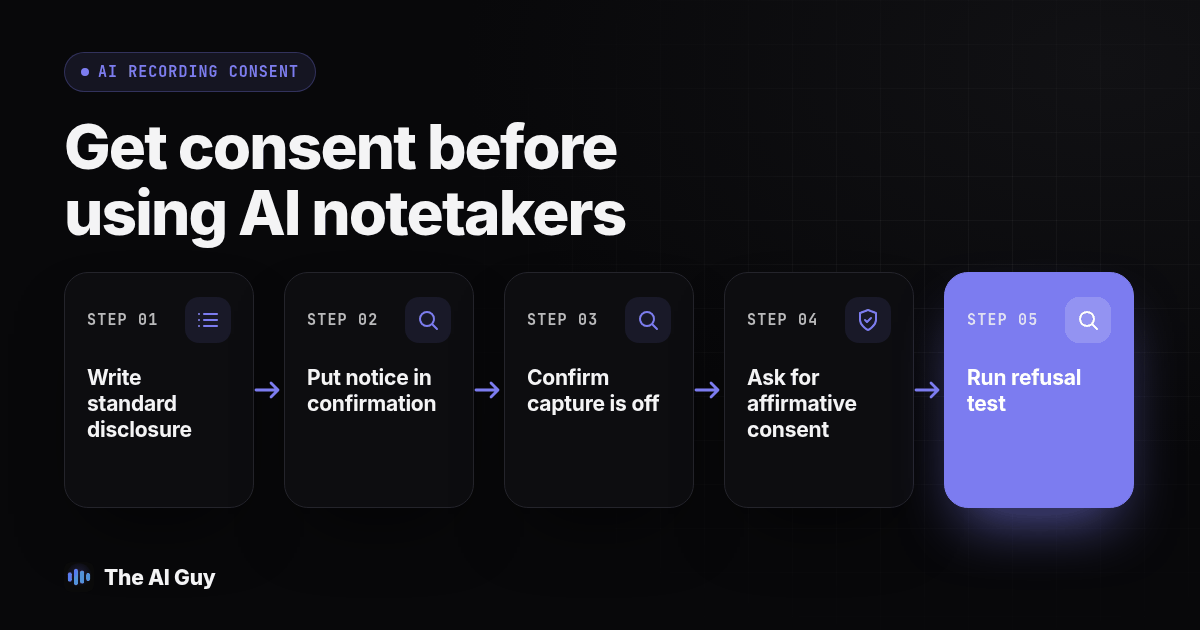
Use this original eight-step procedure as a team rehearsal. Test with fictional information and consenting colleagues before using a client call to discover that an auto-join setting is still enabled.
- Write one standard disclosure with the tool name, purpose, access and retention details. Have the responsible reviewer check it against your actual setup and the requirements for your calls.
- Put the notice in the booking confirmation. Turn off automatic capture and auto-join where available; if your tool cannot wait for agreement, choose a different workflow.
- Assign the host to confirm capture is off at the start. Ask the practice participants for agreement and make an approved written consent record or use an appropriate platform consent log before enabling capture.
- Run the refusal test. Have a colleague decline, then verify the bot and any separate recording or transcription feature remain off. Continue with manual notes and record the preference in the client workflow.
- Run the late-arrival test. Add another colleague after capture starts, pause capture, explain the tool and obtain their agreement before resuming. Decide who watches for new arrivals on real calls.
- Inspect the resulting files and permissions. Check which account owns them, whether invitees automatically receive them and whether someone outside the authorized group can open a shared link.
- Test your retention and deletion workflow with the fictional record. Check the vendor's documentation for backups or limits, and record anything your team cannot verify rather than promising immediate erasure everywhere.
- Train each host to repeat the checks and store the approved script with the call checklist. Repeat the rehearsal after a tool or policy change and correct failed checks before client use.
Your test record should list the date, host, tool configuration, expected result, actual result and any unresolved issue. For example, the refusal test fails if the bot leaves but a second assistant continues transcribing. This is a proposed test, not a report of measured results from a particular product.
What If a Client or Prospect Says No to Being Recorded?
Leave capture off and still take the call. If it has already started, stop it and explain what happened. Do not argue that the tool is harmless because it produces only a summary. The client is objecting to a process, and manually recording agreed decisions can still support the work.
Keep a written note of who declined and when, with access limited to the staff who need that preference. Check it before follow-up meetings. Do not quietly turn the assistant back on because another employee created the next calendar invitation.
If information was captured before the refusal, follow your incident and retention process. Check what was stored or shared and obtain appropriate advice before deleting records that may need preservation. Avoid promising removal from every system until the responsible person has checked what is possible.
Does This Apply to Built-in AI Assistants, Not Just Meeting Bots?
Apply the same review to both. A visible bot and a built-in assistant can have different technical behavior, but neither should be exempt from your disclosure policy just because of where its button appears. Establish what each enabled feature processes before describing it to a client.
If your team uses multiple tools, maintain a short configuration record for each one. Include who can activate it, what output it creates, where that output goes and how the host stops it. Keep the conversation script consistent while making its factual details specific to the tool used on that call.
What FAQs Do Business Owners Ask About AI Notetaker Consent?
Do I still need to disclose an AI notetaker if my state only requires one-party consent?
Your legal obligations depend on the applicable law, contract and profession. A one-party recording rule does not resolve every confidentiality or privacy issue. As a business policy, disclose the assistant and obtain everyone's agreement before capture starts. Lawyer-specific ethics guidance should not be presented as a rule binding every business.
Does an AI meeting assistant count as a recording even if I only keep the summary and delete the transcript?
Do not assume deleting the transcript avoids recording rules. The tool may capture or process audio before producing the summary. California legal guidance warns that AI transcription can fall under recording law. The answer for your setup requires checking how the tool works and which law applies.
What actually happened in the Brewer v. Otter.ai case, and does it affect businesses outside California?
The cited January 2026 legal discussion describes a non-subscriber alleging that a call was recorded and information used without consent, including for AI training. Those allegations are not a finding of liability or a nationwide rule. Businesses elsewhere should review their own capture, sharing and consent processes.
What is the one disclosure rule that works no matter which state a client is calling from?
No single script guarantees compliance everywhere. A practical default is to explain the assistant, its purpose and data handling, obtain agreement from everyone before capture starts, and offer manual notes. Check separate privacy, contract and professional requirements with an appropriate adviser.
Where Can You Get Help With the Rest of the Workflow?
This is general operational guidance, not legal advice for your particular call. Have a qualified adviser review your process for the jurisdictions and industries you serve. Bring the tool settings, sample invitation, disclosure script and retention policy so the discussion addresses what your team actually does.
We cover tool selection and accuracy testing in our guide to picking an AI meeting notes app. For the output side, see how to check AI meeting notes for task owners. If a client sends a sensitive attachment during the meeting, our guide to removing customer information from a PDF before an AI tool receives it covers that preparation step.
For the outbound sales context, RizzDial's guide to AI call recording consent by state discusses the related calling workflow. If you need help organizing approved tools, human review and client information boundaries, contact our team about your AI workflow.