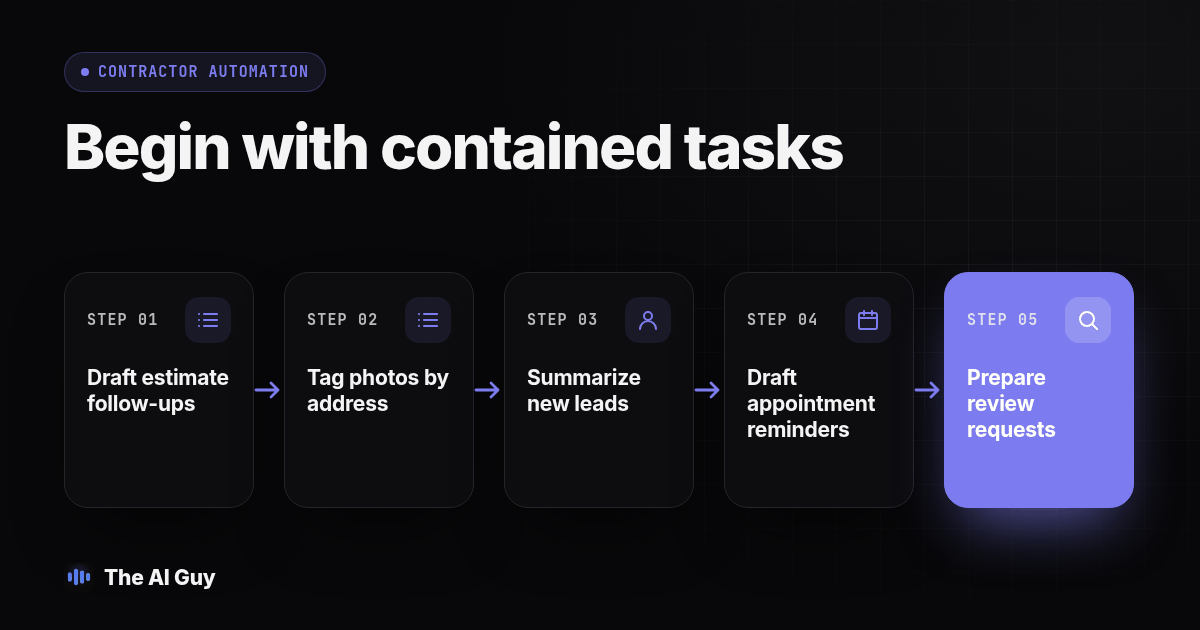
Start with one contained task, such as drafting estimate follow-up messages or sorting job photos by address and stage, and have a named person check every result before it reaches a customer. Lead response and scheduling can move faster once that first task is stable, but pricing, scope changes and anything a customer could rely on in a dispute stay with a person.
A contractor asking this question is often buried in estimates that never got a follow-up, a camera roll with unsorted job photos, or a lead that called yesterday and has not heard back. AI can help organize these tasks, but it should not be handed the whole operation at once. Pick work where a mistake is cheap to catch, test it on real but closed jobs, then widen the pilot only after the team can explain what happened to each lead, photo and message.
Which contractor tasks should AI handle first?
Rank possible tasks by how contained the work is, not by how impressive a software demonstration looks. A practical starting list is:
- Estimate follow-up drafts. Use the estimate identifier, address, scope and amount from the actual document to draft a short question about whether the customer has questions. A person checks the facts and decides whether and when to send it.
- Job photo sorting and tagging. Group photos by address, job stage, and date so a crew member can find the right set without scrolling through a phone. Keep address confirmation with the person who took or uploaded the photos.
- Lead intake summaries. Turn a voicemail, web form or text into a structured record with the customer's name, callback number, address, requested work and preferred timing. Preserve the original message for review.
- Appointment and inspection reminders. Draft routine confirmations from an existing calendar entry. Do not let a model invent an open time or assign crews.
- Review request messages. Prepare a neutral message for a customer after a job is actually closed. Do not select recipients based on whether AI predicts they will leave a positive review.
Each task produces a draft or an organized record, not an unchecked action. That boundary matters more than the brand of software. For a general method to compare possible workflows, see the guide to choosing your first automation task. If your work is mainly heating and cooling service, dispatch and equipment diagnosis have different boundaries; use the AI rollout plan for HVAC companies for those trade-specific decisions.
Before choosing a tool, write down the current process in plain language. Who receives the lead? Where does the estimate live? Who knows whether the schedule is current? Which person can approve a scope change? If the answers are unclear, automation will make the confusion harder to see. Fix the handoff or record ownership first, then decide whether AI can assist one repeatable step.
How should AI draft estimate follow-up messages without sounding robotic?
Start by putting the estimate identifier, address, scope summary, amount and sent date in a reliable internal record. A follow-up message is only as good as the information behind it. A tool guessing at scope from an ambiguous filename can sound confident while telling the customer something wrong.
Have the tool draft a short question tied to a verifiable detail: whether the customer has questions about a tile allowance, whether the proposed start window still works, or whether they want an explanation of a financing option already included in the estimate. A reviewer should compare each detail with the signed estimate before sending. Keep pricing, discounts, scope changes and signed terms anchored to that document. A customer reply that changes scope should go back to the estimator who quoted the job.
This is a reasonable first workflow because the draft can be checked against a source record before it goes out. The broader business process automation overview from OneAdvanced describes automation as a way to handle repeatable processes. It does not establish a measured result for a contractor using AI follow-up, so treat any expected time saving as a hypothesis to measure in your own office. Count the time spent collecting records, reviewing drafts, correcting errors and handling replies, not just the time spent generating text.
A useful follow-up is specific, brief and easy to answer. It should identify the estimate or project, ask one clear question and offer a path to speak with the estimator. Avoid false urgency, pressure about a deadline that is not in the estimate, or a claim that the customer previously agreed to something they did not agree to. If the record does not support a personalized detail, leave that detail out.
How fast should AI respond to a new lead, and what should stay with a person?
Treat the first reply as an acknowledgment, not a negotiation. A supervised workflow can confirm that a request arrived, capture the address and job type, and offer a next step based on information the business has actually confirmed. A person should approve the appointment slot and any price or commitment that reaches the customer.
Write the handoff rule before turning on a workflow. For example, AI may draft an acknowledgment and intake summary, while an office manager confirms the time and an estimator handles price questions. Route unusual questions to a person: a reported roof leak, a code concern, a request to match another bid, or a financing question. Do not let the system improvise a technical judgment or imply that a specific person accepted a transfer when nobody did.
Decide what the system should do when it cannot reach the calendar, when the form omits an address, or when a customer asks for a time outside normal hours. A safe fallback is to record the request and say that staff will confirm. A delayed confirmation is inconvenient. A false promise that a crew is available can disrupt the job schedule and damage trust.
For automated calls or texts, review the rules that apply to your lead source, message type and jurisdiction before enabling them. The FCC has said AI-generated voices are artificial voices under the TCPA in its declaratory ruling. That ruling concerns calls and does not settle every texting or consent question for every contractor. Ask your own counsel to confirm the requirements for your workflow, keep consent records where applicable, and provide a clear human contact path.
What should AI do with job site photos?
Photo sorting is a contained task when the correct project record is available. Have a tool suggest tags using the job address, date and stage, such as before, during, after or punch list. A crew member still confirms the address and checks that the image belongs in that project folder. AI can help file and retrieve; it should not be treated as proof that work met a code or contract requirement.
This matters for more than convenience. The EPA says contractors doing renovation, repair or painting in target housing and child-occupied facilities built before 1978 may be subject to the Renovation, Repair and Painting Rule, which includes certification and lead-safe work practices. Review the EPA RRP program for the rule and its scope. Dated photos of containment and signage can help a business keep an organized project record, but the photos do not replace required practices, records or professional judgment.
Give the photo workflow a simple folder structure that reflects how the office searches. One option is project address, then date and stage. Use a project identifier if multiple jobs share an address or if a customer privacy policy calls for a less visible label. Keep originals and preserve metadata when your process requires it. If a tool creates captions, ask it to separate visible observations from assumptions. “Plastic sheeting visible near doorway” is an observation; “lead containment passed inspection” is a conclusion that requires qualified review.
Screenshot: a phone photo app showing a job folder structured by street address, with before, during, after and punch-list subfolders, and one photo thumbnail with an AI-suggested caption, date and edit button.
How should AI handle scheduling and appointment reminders?
Start with confirmations, not crew assignments. A reminder can be drafted from a confirmed calendar entry and include the technician's name, time window and a preparation note the business has approved. The dispatcher should continue to decide which crew goes where and what gets rescheduled after weather or supply delays.
Set an explicit fallback for calendar outages and conflicting appointments. If the assistant cannot retrieve a confirmed slot, it should record the request and tell the customer that staff will follow up. A reminder must reflect the current calendar, not a cached version from before a change. Let the customer reply through a monitored business channel so a reschedule request reaches someone who can act on it.
For examples of how phone-based field communication can be organized, our sister site Beam has a guide to iMessage for roofing contractors. The operational point applies to other trades too: keep customer updates and job context findable for the staff member who needs to respond, and make clear who owns the next step.
How does this differ from a single trade such as HVAC?
The broad workflow is similar across trades: intake, scheduling, estimate follow-up and recordkeeping. The boundary changes with the technical judgment and training required. In HVAC, equipment diagnosis, refrigerant work and dispatch urgency can require qualified people. A general contractor coordinating multiple trades may instead face a greater risk around subcontractor handoffs, change orders and the scope recorded in a signed proposal.
AI can flag that a subcontractor has not supplied a required document or that a milestone appears overdue, provided the project record is reliable. It should not alter signed scope, quote a change or promise a revised timeline without approval from the person responsible for the job. If you perform HVAC service alongside general contracting, use the workflow guidance that matches the task and keep each trade's technical decisions with qualified staff.
How should you test an AI estimate and follow-up workflow before trusting it with customers?
Use a fixed test set before any AI-drafted message reaches a live customer. The procedure below uses closed jobs so the team can compare each output with a known record. Follow your own privacy and data handling rules when preparing copies.
- Select five closed jobs with complete records: estimate, scope, address, relevant photos and known outcome. Work from copies and leave active customer records untouched.
- Ask the tool to draft a follow-up message, photo tags and intake summary for each job. Limit it to information in the selected records.
- Compare every address, amount, date and scope detail against the source documents, field by field. Record mismatches instead of correcting them silently.
- Add incomplete examples, including a missing address, an estimate with a missing line item and a photo without a project tag. Confirm the tool flags the gap rather than filling it with a plausible guess.
- Simulate a customer changing the requested scope mid-conversation. Check that the system routes the change to the estimator and does not revise or send a new price on its own.
- Have the person who will review messages run the test. Ask them to record anything they would have missed without comparing against the source.
- Set pass or fail conditions before reviewing results. For instance, you could require zero amount mismatches and review every address-tag error before launch. Choose a threshold that fits the consequence of a mistake.
- Save the test records, outputs, corrections and decision. When you change the estimating tool, CRM connection or model, rerun the relevant cases before restoring live access.
The test is useful only if the same person can repeat it and explain a failure. If the workflow fails, narrow its inputs, clarify the instructions or remove the task from automation. Do not treat a fluent answer as a passed test. Keep the source record beside the output so reviewers can verify each claim quickly.
What should you check by hand before anything reaches a customer?
Keep a short review gate beside the employee responsible for approvals. Before a drafted message or photo set goes out, confirm that the estimate amount, scope and address match the signed record; a named person reviewed this specific output; and a scope change returned to the person who quoted the job. Check that photos belong to the correct address and stage, and that no draft promises a price, start date or outcome the estimator or dispatcher has not confirmed.
Also check whether the customer has asked not to be contacted, whether the response needs a technical answer, and whether the record contains enough information to act. If anything is unclear, pause the automatic step and assign a person. A tool that handles routine drafts and returns exceptions for review is doing useful work, even if it does not make every decision itself.
What do contractors ask about using AI for estimates and follow-up FAQ?
How much does it cost to start using AI for estimates and lead follow-up?
Start with tools you already pay for and check their current features before adding another product. If you add a tool, consider the subscription and the owner or office manager's review time. Ask vendors how they charge and what data moves between systems, then compare the total with your current workflow. Do not assume a feature is included or available until you confirm it with the vendor.
How long does it take to set up an AI workflow for a contracting business?
A small pilot can be configured in an afternoon if the task, records and reviewer are already clear, then evaluated over a week of real work. A rollout across an estimate queue or photo library takes longer when records need cleanup or staff responsibilities change. Treat timing as dependent on your systems and process, not a guaranteed setup duration.
Will AI tools work with the estimating or job management software we already use?
Compatibility depends on the specific products and the data they expose. Check whether an integration can read and write the fields you need, what happens when a connection fails, and whether you can export the records. Test with a small set of jobs before routing an active pipeline through it.
Is it safe to let AI text or call leads automatically, and do we need their consent first?
Automated calls and texts can be subject to telemarketing and robocall requirements, and the FCC has classified AI-generated voices as artificial voices under the TCPA. Requirements depend on the call or text, consent, lead source and applicable law. Ask your own counsel to review the workflow before automatic outreach begins, keep the relevant consent records, and make a human contact path available.
What should a contractor do this week?
Choose one task from the ranked list, preferably the one that creates the most repeat office work and has an easy source record. Name the reviewer, prepare closed-job examples and write the pass conditions before looking at outputs. Keep the workflow in draft mode until it passes, then start with a limited queue and check its errors and review time over real work.
If you want a second opinion on which task to pilot, or need help mapping an AI workflow to your existing process, contact us and describe the work taking the most time in your office. We will help identify what is ready to automate and what should remain with a person.