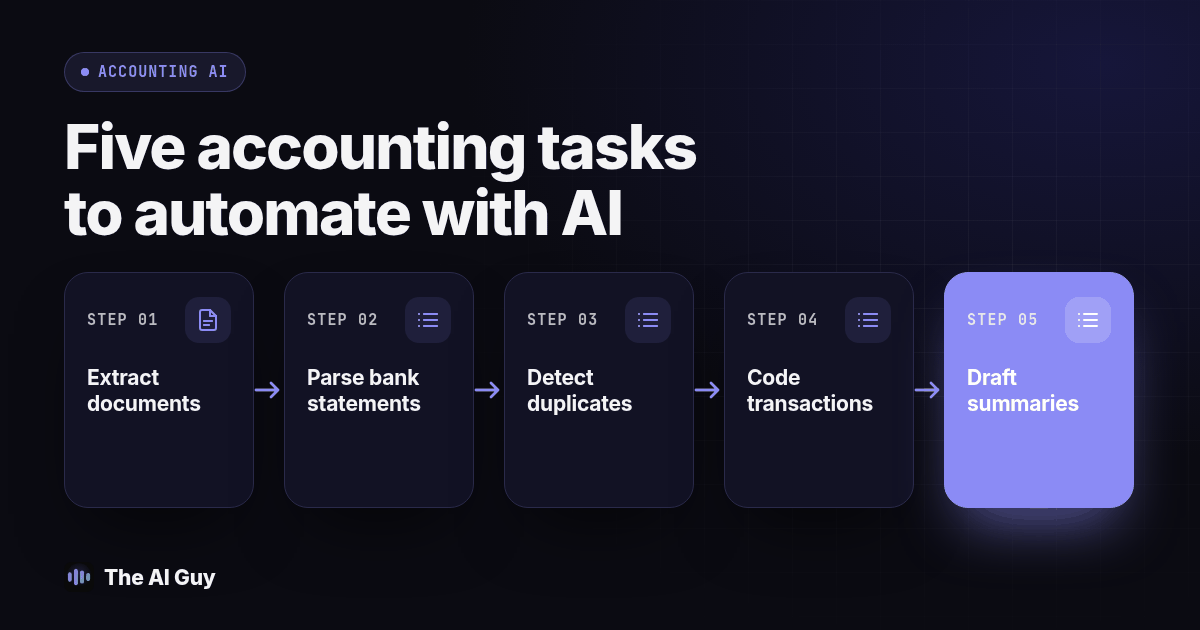
TL;DR: Hand AI these five tasks first: document extraction, bank statement parsing, duplicate detection, transaction coding, and drafting (not sending) client summaries. Every one of them stays in draft form until a named person checks it against the source record. None of them should touch a live client file before you test it against a month you have already closed.
A firm owner asking this question is usually past the "should we use AI" debate and stuck on a harder one: which task first, and who signs off before a client sees the output. The five tasks below have enough structure that AI gets useful results fast, and enough risk that skipping the review step costs a client relationship, not just an afternoon of rework.
Which five tasks should an accounting or bookkeeping firm hand to AI first?
Rank these by how contained the task is, not by how impressive the demo looks.
- Document extraction. Pull vendor name, invoice number, line items, and totals off a receipt or invoice into a structured record.
- Bank statement parsing. Turn a PDF or CSV bank statement into rows your ledger software can read, matched against existing transactions.
- Duplicate detection. Flag a transaction that looks like it was already entered, paid twice, or billed twice by a vendor.
- Transaction coding. Propose a general ledger category or class for a transaction based on payee, amount, and history.
- Draft client summaries. Write a first-pass monthly or quarterly summary of activity, written for the client to read, not for the ledger.
Each one produces a draft. None of them produces a finished answer. That distinction is the whole article. If you want the deeper, single-task walkthrough on the bank-matching step specifically, with a detailed review sequence, see our guide to reviewing AI bank matches before you approve them. This piece is the wider rollout plan; that one is the zoomed-in procedure for task two. And if your real worry is whether AI replaces your staff rather than which task to start with, that is a separate question we answer directly in will AI replace accountants.
What should a person check before AI-extracted document data reaches a client file?
Extraction tools read a scanned receipt or invoice and output fields: vendor, date, amount, line items, tax. One failure to check is a right-looking total attached to the wrong invoice, a dropped line item, or a vendor name that matches a different vendor with a similar name in your records.
Before any extracted document moves into a client's books, open the original image next to the extracted fields and check three things by hand: the total matches to the cent, the invoice or reference number traces back cleanly, and the vendor matches an existing record rather than creating a near-duplicate. Intuit documents this review boundary: uploaded receipts become extracted information for review, with options to match an existing transaction or add a new one. That is a useful distinction to preserve in your own workflow (Intuit receipt guidance).
Treat extraction as a fast typist, not an auditor, one who is occasionally confident about the wrong line.
How do you check AI bank statement parsing before you trust the numbers?
Bank parsing takes a statement, a format banks seem to redesign every few years, and turns it into transactions your software can match or import. The tool's own confidence score is not evidence. The reconciled bank balance at period end is evidence.
Pull a bank statement from a month you have already closed and reconciled by hand, run it through the parsing tool, then compare the ending balance it produces to your already-reconciled number, line by line where they disagree. Keep parsing separate from reconciliation. Xero describes reconciliation as matching a statement line to an existing transaction or creating a transaction when appropriate. A readable imported row does not establish which action is correct (Xero reconciliation guidance).
Include these three cases in your parsing and matching test: a transfer between two of a client's own accounts that gets mistaken for income, a split transaction where one bank line actually covers two ledger entries, and a date format mismatch that puts a transaction in the wrong period. Check for all three before you trust a full month's import.
What causes AI duplicate detection to miss or over-flag transactions?
Duplicate detection compares a new transaction against existing records and flags a likely repeat. A missed duplicate can cause a repeated payment or bill. A false flag can delay a legitimate entry. Keep both outcomes in the review log, and do not allow a flag to delete or merge records automatically.
Test a split invoice, a recurring subscription and two similar vendor invoices. A matcher that relies on amount and date may confuse legitimate installments with repeated entries. Conversely, a repeated invoice with a changed reference or amount may escape an exact-match check. These are test cases, not measured failure rates. Keep a short list of known recurring charges, then resolve each flag against the source invoice, payment history and ledger. Document why you kept or rejected it so another reviewer can follow the decision.
What must a reviewer confirm before approving AI transaction coding?
Coding proposes a general ledger category for a transaction: office supplies, meals, owner's draw, a client refund. A suggestion based on payee name and amount can miss what the business actually purchased or why.
Before accepting a coding suggestion, confirm the category matches the actual purpose of the purchase, not just the payee's typical category, and watch for the three transaction types to include in your coding test: an owner's draw that resembles a vendor payment, a related-party loan that resembles a refund, and a one-time reimbursement that resembles revenue. Our deeper look at reviewing AI bookkeeping suggestions flags this same trio, and checking those cases can catch a coding error before it compounds across a dozen similar transactions.
A tool that codes routine, repeat transactions well and still needs a human for every ambiguous one is working as intended. That split is the point, not a flaw to fix.
What should never ship in an AI-drafted client summary without a second look?
A draft summary turns a month of transactions into plain-language paragraphs: revenue moved up, a specific expense category grew, cash position changed. Clients read these. That is exactly why this task sits last on the list and gets the strictest review, even though the underlying writing task looks easy.
Three things need a human eye before a draft summary goes out. First, any sentence that implies causation, "expenses rose because of X", when the data only shows correlation. An AI draft will confidently assign a cause it cannot actually verify from transaction data alone. Second, any forward-looking statement, a prediction about next quarter, that reads like advice rather than a description of what already happened. Third, any number in the summary that does not match the number in the underlying ledger exactly, because a model will occasionally round, restate, or combine figures in a way that reads smoothly and is simply wrong. Read the draft against the ledger line by line before it reaches a client's inbox. We do not treat this as tax or financial advice, and neither should the summary; keep it descriptive, not advisory.
How do these five tasks compare on risk and required review?
| Task | What AI drafts | Main failure to catch | Who signs off |
|---|---|---|---|
| Document extraction | Vendor, amount, line items from a receipt or invoice | Right-looking total on the wrong document | Staff reviewer against the original image |
| Bank statement parsing | Structured transactions from a bank statement | Transfers or splits mismatched against the reconciled balance | Staff reviewer against a closed-period reconciliation |
| Duplicate detection | A flag on a likely repeat transaction | Missed duplicate on a split invoice, or a false flag on a recurring charge | Staff reviewer with a known-recurring-charge list |
| Transaction coding | A general ledger category suggestion | Owner's draw, related-party loan, or reimbursement miscoded | Bookkeeper, with owner input on ambiguous items |
| Draft client summaries | Plain-language monthly or quarterly narrative | Implied causation, forward-looking claims, or a figure that drifts from the ledger | Named reviewer, checked against the ledger before sending |
Read the table as a rollout order, not a ranking of tools. Extraction and parsing are the safest starting points because the check against them is fast and nearly binary: does the number match the source, yes or no. Coding and client summaries ask a reviewer to catch a wrong interpretation, not just a wrong figure, which takes longer and needs more judgment.
How should a firm test any of these tasks before trusting it on a live client file?
Run this sequence on every task before it touches an open file, not just once at setup but again any time you change tools or the tool updates its model.
- Pick an approved working copy of one already-closed month for one client, a period you have reconciled and know cold. Keep the original read-only; use synthetic records until data handling is approved.
- Strip or mask anything the tool does not need, following our guide on removing customer information from a document before AI sees it.
- Run the task, extraction, parsing, duplicate check, coding, or summary draft, against that closed month only, never an open file on the first pass.
- Compare every output against your reconciled numbers, line by line, not just the total.
- Log every mismatch by type: wrong vendor match, missed duplicate, miscoded transaction, drifted figure.
- Set a plain pass or fail rule before you look at results, for example "zero figure mismatches, up to two minor vendor-name misses on extraction."
- If it passes, name a reviewer and run a thirty day pilot on one real client. If it fails, fix the setup or drop the tool before it sees a live file.
Keep a copy-paste version of this on hand for your team:
Before this goes to a client, confirm:
- The figure in the draft matches the source record exactly, not approximately.
- A named person, not "the system," reviewed this specific output.
- Any flagged exception has a written resolution, not a silent override.
- No forward-looking or causal claim appears without a person standing behind it.
- The pilot uses an approved copy, and the original closed records remain unchanged.
How do you protect client confidentiality when AI tools touch financial documents?
Depending on the tool, these tasks may send client financial documents to a separate service or a provider already connected to your accounting platform. That is a confidentiality question before it is an accuracy question, and it deserves its own checklist, separate from whether the output is correct.
Start with what a tool actually needs to see. Extraction and bank parsing generally do not need a client's name, address, or account number to pull a line item or match a transaction; strip what you can before upload, the same practice we lay out in our guide to removing customer information from a PDF before AI sees it. The IRS's archived 2019 "Security Six" guidance describes basic protections: antivirus software, firewalls, two-factor authentication, backups, drive encryption, and a virtual private network for remote connections (IRS). An AI vendor is a service provider like any other software connected to a client file, and requires its own data-handling review. This historical checklist is background, not a complete statement of current obligations.
Write down who on your team may use which tool on which client's files, and what happens if a tool is misused. Our one-page AI use policy for a small team is built for exactly this: short enough that staff actually read it, naming approved tools and what data can go into them.
Confidentiality extends to how your team requests the missing document in the first place. If staff text a client to ask for a missing receipt or confirm a figure, use an approved business messaging workflow and request sensitive documents through your secure portal. Our sister site Beam explains messaging consent, opt-outs and number-type requirements for business texting (Beam's texting compliance guide).
None of this is tax advice. It is a data-handling checklist for the software layer sitting between your firm and a client's financial records, and it belongs next to your engagement letter, not inside it.
What are the FAQs about handing accounting tasks to AI first?
How much does it cost to try AI on these five tasks before we commit to anything?
Start by testing capabilities already included in your approved accounting software. Before enabling another service, confirm trial restrictions, billing terms, export access and who can authorize a purchase. Budget staff time for review and corrections as well as setup; a short demo does not establish the ongoing effort.
How long does it actually take to set this up for a small firm?
Setup time depends on your software, permissions, document quality and review process. Separate enabling a feature from approving it for client work. Run the closed-period test first, then use the thirty day pilot suggested here to observe exceptions and reviewer workload before expanding.
Does our existing bookkeeping software already do this, or do we need a separate tool?
Check your current platform first. Receipt extraction, suggested matches and bank rules may already cover part of the workflow. Confirm which features your account includes, whether they create drafts or post entries, and who must review them. A fixed bank rule is not the same thing as an AI judgment.
Is it safe to upload a client's bank statements or tax documents to an AI tool?
Only after your firm approves the tool, data use and access controls. Confirm retention, training use, vendor access, deletion and your client obligations. Start with synthetic or properly de-identified records. A closed accounting period still contains confidential data and does not make an upload safe by itself.
What happens to our records if we switch AI tools later?
Keep the underlying ledger, the general ledger entries, and your own review notes inside your accounting system of record, not locked inside the AI vendor's interface, so switching tools later means changing where suggestions come from, not rebuilding your books.
What should your firm do this week?
Pick one of the five tasks, the one costing your team the most hours right now, and run the seven-step test above against a single closed month before it ever touches an open file. Name a reviewer, write down your pass or fail rule in advance, and do not skip the thirty day pilot just because the first test looked clean.
If you want help deciding which of these five fits your firm first, or you are weighing a client-confidentiality question the checklist above did not cover, contact us and tell us which task is eating the most staff hours. We will tell you plainly what is ready to hand off now and what should stay with a person for a while longer.