Google renamed NotebookLM to Gemini Notebook on July 16, 2026. It remains a standalone research product, with code execution and closer Gemini app connections added around its document research workflow. For a small business, start with one approved SOP or supplier agreement, ask a question, and check the cited passage before relying on the answer.
The rename does not mean you need to rebuild your document library. It does mean older tutorials can misdescribe what the product now does. This guide separates Google's announcement from a practical setup and test you can run with your own business documents. Product documentation was checked on October 20, 2026.
What Actually Changed When NotebookLM Became Gemini Notebook?
Google's July 16 announcement describes the same standalone product under a new name. It also introduces a secure cloud computer for native code execution and describes cross-app syncing with Gemini. At announcement, code execution was available to Google AI Ultra users and eligible Workspace customers, with Pro access planned over the following weeks. Those are launch details, not a promise about what every account can use today.
For an owner comparing supplier spreadsheets, code execution is worth checking in the account before planning the workflow. Ask for the calculation method and inspect the input rows. A tool that can run arithmetic still needs the right numbers and a sensible question. Do not let a polished chart stand in for checking whether the calculation included the relevant records.
Why Does the Rename Confuse People Who Already Use It?
The name now overlaps with the Gemini app, while older training materials and bookmarks still say NotebookLM. Google's announcement links the familiar notebooklm.google entry point; current help pages also point to notebook.google.com. Use Google's own links and the same approved business account when checking where your notebooks are available.
Explain the change to staff in one sentence: the research notebook continues, but its surrounding capabilities have expanded. Then check the account together. Find the notebook, open a known source, and repeat a familiar question. This is a practical continuity check, not a reason to upload the entire company drive again or create duplicate libraries with uncertain ownership.
What Does a Notebook Actually Do That a Chatbot Doesn't?
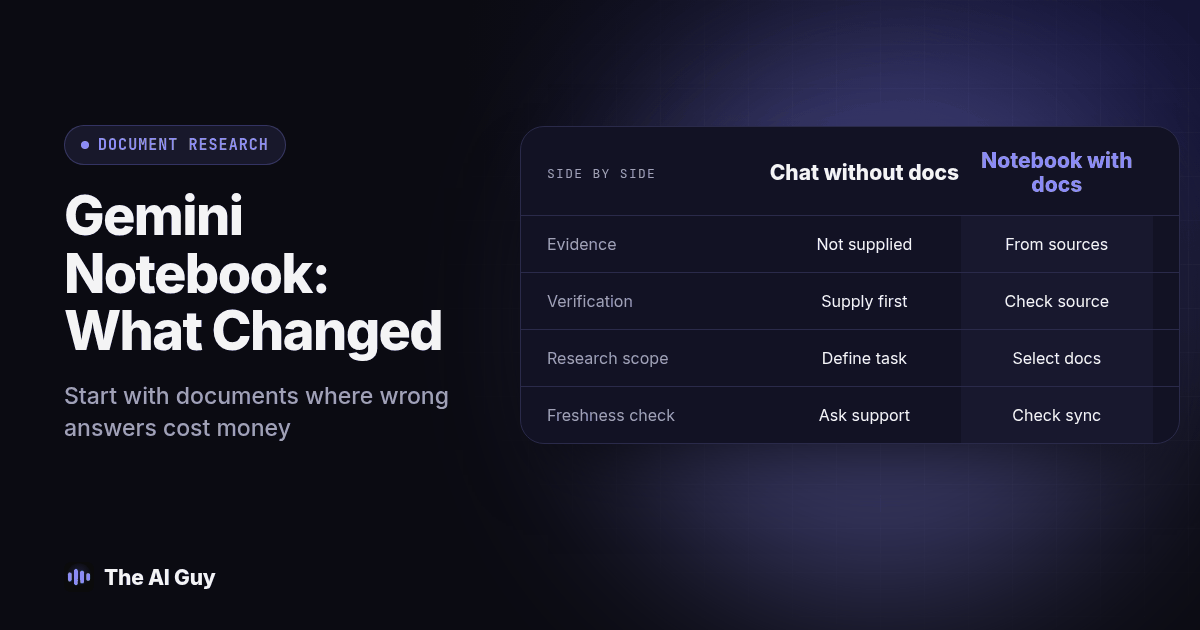
The useful distinction is the workflow you configure. A conversation without the relevant document cannot establish what your particular agreement says. A document research workspace gives you selected material to question and a source trail to inspect. Do not assume a chatbot has no citation features, or that a notebook makes every answer correct.
Google's chat documentation explains how citations let you open quoted material in context. It also describes experimental capabilities such as web research, code execution and downloadable outputs. For the first test, select the approved documents and ask the notebook to answer only from those sources, flagging anything they do not establish.
| What you're checking | A general conversation without your documents | A notebook with selected business sources |
|---|---|---|
| Evidence for your agreement | The relevant agreement has not been supplied | Inspect the selected agreement and citations |
| Verification task | Supply evidence before treating an answer as specific | Open the cited passage and check context |
| Research scope | Define the task and permitted information | Select documents and explicitly limit the question |
| Freshness check | Ask what information supports the answer | Check source version and import or sync status |
| Useful first task | Brainstorm questions to investigate | Locate a clause or compare approved procedures |
| Action permissions | Check the tools and permissions actually enabled | Check connected apps before allowing actions |
This comparison describes two setups, not a claim that one brand can cite sources and another cannot. Choose the workflow that makes review easiest for the person responsible for the decision. Our guide to switching from ChatGPT to Claude covers the separate question of changing an everyday assistant.
Which Documents Should a Small Business Actually Put Into a Notebook?
Start with documents where a wrong answer actually costs you something, not with everything in your Google Drive. Three categories make useful starting points for a supervised pilot.
Standard operating procedures are the easiest win. If you have ever watched a new hire ask the same three questions a new hire always asks, upload the SOPs that answer them and let the new hire query the notebook directly, and require them to verify important answers against the approved procedure.
Supplier and vendor contracts are the second category, and the highest-stakes one. A notebook will not replace a lawyer reading a contract before you sign it; we cover that distinction directly in our piece on using AI to review a contract. What a notebook is good for is the question that comes up six months after signing: what does section 4.2 actually say about the renewal window, and can you point to the exact clause in an email to the vendor without re-reading twelve pages first.
Competitor pages are the third category. Record the page address and the date you reviewed it, then check the live page again before acting on a comparison. Do not confuse being able to discover a source with a guarantee that an old imported page stays current. Google's Deep Research announcement describes web discovery and importing research results into a notebook.
Before adding any of these documents, choose a person who owns the source list. Ask them to approve the exact versions and remove material staff do not need for the task. A training notebook should not become an accidental archive of private customer details, outdated promises, or draft policies that were never approved. Start with a sanitized example when testing a new account or sharing arrangement.
How Do You Set Up a Notebook, Step by Step?
Use this original setup procedure for one limited business task. Record the result of each check so a coworker can repeat it.
- Open Gemini Notebook through Google's official entry point and sign in with your approved business account. Check that your administrator allows its use.
- Click "Create new" and name the notebook something specific to the task, not generic. "Vendor contracts 2026," not "Documents."
- Add your first source. PDFs, Google Docs, plain text, and pasted URLs all work; the tool also accepts YouTube links, though it works from the transcript, not the video itself.
- Wait for the source to finish processing before you ask a question. Confirm the imported text is readable, particularly when a contract contains scanned pages or tables.
- Ask a question you already know the answer to first, not a question you're genuinely unsure about. This is your calibration question, and it matters more than people expect.
- Check the citation on that first answer. Click through to confirm it actually points at the sentence that supports the answer, not a loosely related paragraph nearby.
- Add two or three more related sources to the same notebook so the tool can compare across documents, not just answer from one.
- Ask a question that spans multiple sources, like "which of these three supplier contracts has the shortest cancellation notice period," and check that the citation correctly attributes each part of the answer.
- Try the Audio Overview feature on a dense source if you have a team member who would rather listen than read; it generates a conversational, podcast-style summary of the uploaded material.
- Share the notebook with a coworker using the share option if more than one person needs to query the same sources, rather than each of you uploading the same documents separately.
- Set a review reminder tied to how often the documents change. Check Drive sync status for supported imports and replace uploaded copies when the originals change.
- Write down, somewhere your team will actually see it, which notebook is the "trusted" one for which topic, so new hires are not guessing between several loosely maintained notebooks with overlapping sources.
How Do You Test a New Notebook Before You Trust It With Anything Real?
Treat a brand-new notebook the same way you would treat a brand-new employee: verify before you rely on it. Use the following acceptance test before sharing its answers as business guidance.
- Ask it three questions where you already know the exact correct answer, pulled straight from the source document, and confirm all three citations point at the right passage.
- Ask it one question the source document does not actually answer, and confirm it says so rather than guessing. A notebook that quietly fills gaps with outside knowledge is not doing its job.
- Ask the same question two different ways and compare the two answers for consistency, not just correctness.
- Have someone other than the person who built the notebook run the same three test questions, since the builder already knows the right answer and will read generosity into a shaky response.
- Check the source list itself for anything outdated, a contract that has since been amended, an SOP that changed last quarter, before you let anyone treat the notebook as current.
If a notebook fails any of those checks, inspect the source list, question wording and response together. Add missing evidence or remove stale material, then repeat the test. If the answer remains unreliable, keep that task with a person. Apply that standard to AI research generally; see how we verify sources in an AI research answer for the broader version of this habit, and how we compare business document versions with AI for the related question of catching what actually changed between two drafts of the same contract or SOP.
What Limits and Permissions Should You Check Before Relying on It?
Old descriptions that say the product cannot search the web or connect to anything are no longer a safe guide. Google's connected apps documentation says the web experience can use enabled apps and lets you inspect their supported actions under Settings. A newly connected app is enabled across notebooks; you can disable it for a particular notebook in Configure Chat. Review this before treating a notebook as a document-only workspace.
That does not establish that your particular CRM or email action is supported. Inspect the available app, its permissions and its action description. For this pilot, disable unnecessary connections and keep sending, booking and record changes outside the exercise. If you later connect an operational system, test with noncustomer records and require someone to approve the outcome.
Source maintenance also depends on the source type. Google's source guide describes automatic updates for supported Drive imports and a manual sync option. Uploaded copies still need a maintenance process. Web imports capture page text, and YouTube imports use transcripts. Check what was actually imported before expecting the notebook to interpret a diagram, video demonstration, comment or missing appendix.
For a service business moving from document questions to a live sales workflow, MetaTechAi's AI infrastructure approach is a relevant next step. The business question is who approves actions, maintains access and fixes failures. A useful document answer alone does not establish that a system is ready to operate a sales process.
What Should You Record After the Test?
Keep a short acceptance record alongside the notebook link. Include the approved task, document owner, version date, test questions, expected answers, actual answers and the passages that supported them. Mark each result as supported, unsupported or needing review. This makes the decision repeatable without pretending a small pilot proves the tool will answer every future question correctly.
For example, use a fictional supplier agreement to test cancellation language. Ask for the notice period, the delivery method for notice and the clause that supports each answer. Then remove the delivery-method clause and ask again. A useful result makes the missing information clear. If the answer invents a method, record the failure and keep that question out of the approved workflow until a repeat test passes.
Have a coworker complete the same exercise without seeing your expected answers. Compare what they understood, not just whether the output looked plausible. If they cannot find the supporting passage or distinguish a current contract from an old one, improve the labels and instructions before sharing the notebook more widely. Retest after changing sources, permissions or the approved task.
What Are the Common Small Business FAQ Questions?
Do I need a subscription before testing a notebook?
Check your account's available features and usage limits before choosing a plan. Start with one approved document and a small acceptance test. Do not assume code execution, research allowances or source capacity are identical across accounts.
How long should I allow for the first notebook test?
Allow enough time to inspect the imported source, ask known-answer questions and have a coworker repeat the checks. Upload time alone does not measure readiness. Finish the acceptance record before using an answer in a business decision.
Does Gemini Notebook connect to my CRM or email?
The web experience supports connected apps, but that does not prove your particular CRM or email action is available. Inspect the app's supported actions and permissions in your account. Disable unnecessary connections during a document-only pilot.
How is a notebook different from an ordinary chatbot conversation?
A notebook organizes selected sources for document research and provides citations you can inspect. A conversation without your agreement cannot establish what that agreement says. Compare the evidence available in each setup, and verify important answers in either tool.
Can Gemini Notebook research current web information?
Yes, Google documents web research and importing discovered sources. That does not guarantee an earlier imported page is current. Check the live source and review date before acting on changing information, and keep public research separate from approved internal procedures.
How Can You Decide Whether This Fits Your Business?
Choose one repeat question that staff already answer by opening a document. Compare the notebook answer with the approved source and record what the reviewer had to correct. Expand only when the source owner and a second reviewer can explain why the answer is supported. If source maintenance takes more effort than the task saves, keep the simpler manual process.
If you are weighing whether a grounded tool like this fits into a bigger AI setup for your business, or whether you need something that acts on your systems, contact our team. Bring the task, a sanitized document and the questions your team needs answered so the discussion starts with your actual workflow.